
You can get a prototype working fast with vibe coding. The hard part is what comes after vibe coding: turning a promising demo into a product that survives real users, real data, and real edge cases without you babysitting it.
What vibe coding gets right and where it breaks
Vibe Coding is powerful, especially when you are:
-
Testing demand fast: You can validate a workflow, a landing page promise, or a niche idea before you invest weeks.
-
Skipping busywork: CRUD (create, read, update, delete) screens, basic database wiring, and simple automations are no longer a bottleneck.
-
Staying in momentum: When you can iterate in minutes, you keep clarity. That clarity is worth money.
It breaks down when the app has to behave like a real product:
-
No clear requirements: If you do not write acceptance criteria, the app "works" until a user does something slightly different.
-
No safety net: Without tests, every change becomes a gamble. You stop improving the product because you fear breaking it.
-
Hidden security risks: AI can generate insecure patterns confidently. If you do not verify, you inherit risk.
-
No deployment discipline: Shipping goes beyond "it runs on my machine". You need repeatable builds, controlled releases, and monitoring.
You can keep moving fast and still add a few guardrails.
What comes after vibe coding: a repeatable build-to-ship workflow
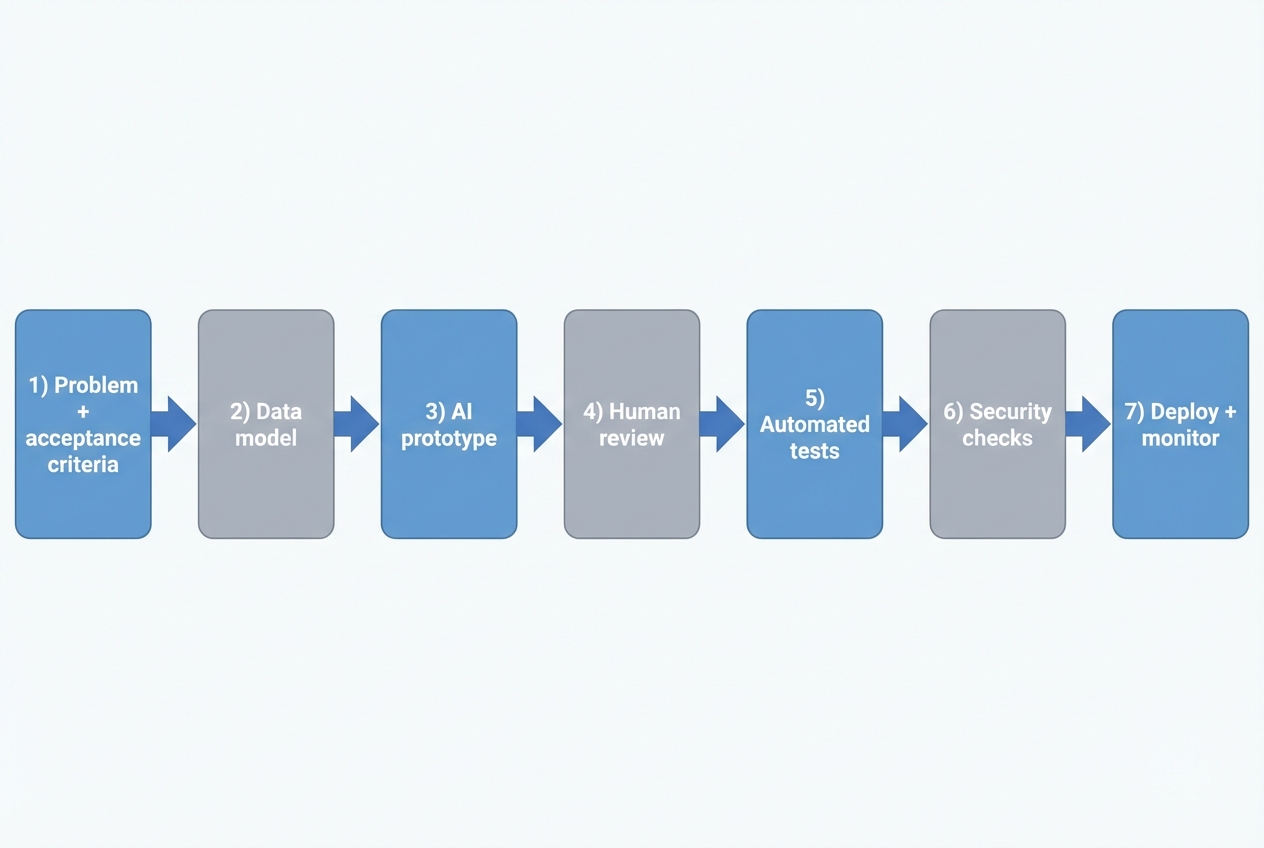
After vibe coding comes a lightweight software delivery loop. Start with acceptance criteria and a data model. Generate a first version with AI, then review it. Add automated tests and basic security checks. Deploy with monitoring.
Here is the workflow you can adopt:
-
Problem statement and acceptance criteria: Write what "done" means in plain English.
- Example: "A client can request a report, the request routes to the right analyst, and the client gets an email when it is ready. Admins can see status for every request."
-
Data model: List the core objects and fields.
- Example: Client, Request, Analyst, Status, DueDate, FileLink.
-
AI prototype: Generate screens and workflows. Keep it simple and aim for working, not perfect.
-
Human review: Treat AI output like a junior developer's first draft. Check naming, logic, edge cases, and security assumptions.
-
Automated tests: Add a small test set that protects the key user flows.
-
Security checks: Scan dependencies, verify authentication and authorization, and check common web risks.
-
Deploy and monitor: Push to production in a repeatable way, then watch logs and error rates.
If you are using an AI app builder, the prototype step becomes trivial. Your real investment shifts to review, testing, and hardening.
QuantumByte can help on both sides of that curve: an AI builder for fast iteration, plus a development team for production-grade finishing work when the last 20% becomes the real business risk.
For a quick picture of how this idea-to-app flow works in practice, see how an AI app builder works.
The minimum quality bar: specs, tests, and reviews
You do not need to write a 40-page specification. Aim for a small, shared truth that you and your AI tool can both follow.
Use this three-part quality bar.
-
Write acceptance criteria you can test: Make it observable. "User can export CSV" is testable. "User can easily export CSV" is not.
-
Protect the one to three critical flows: Pick the actions that create value. For a service business, it might be "intake → assignment → delivery". For a SaaS (software as a service), it might be "signup → activation → payment".
-
Review changes to protect future you: Focus on correctness, clarity, and risk. Style matters, but it comes after behavior and safety.
A strong, widely adopted review principle is to approve changes once they improve overall code health, even if they are not perfect. Google captures this clearly in its Engineering Practices code review guidance.
What to test first
Start small and ruthless. If you are overwhelmed, test these first:
-
Login and permissions: The wrong person should never see the wrong data.
-
Money paths: Anything tied to payments, invoices, credits, or refunds.
-
Data integrity: Create, update, delete, and import flows.
-
Integrations: Any API (application programming interface) call to third parties.
If you want help getting AI to build from clearer inputs, use structured prompting. We covered AI app builder prompts, which is a practical way to turn "make me an app" into instructions the system can actually follow.
Security and compliance without slowing down
Security is where "it works" turns into "we can trust it". The good news is you can do a lot without a security team.
A reliable baseline is the National Institute of Standards and Technology (NIST) Secure Software Development Framework (SSDF). NIST describes the SSDF as a set of practices you can integrate into your software development life cycle (SDLC) to reduce vulnerabilities and their impact.
For web apps, you also need a checklist that translates "secure" into concrete requirements. The OWASP (Open Worldwide Application Security Project) Application Security Verification Standard (ASVS) is built for that.
Finally, remember that modern apps are built from dependencies. Your security is only as strong as your supply chain. SLSA (Supply-chain Levels for Software Artifacts) is a practical, incrementally adoptable framework for supply chain security.
A simple security checklist for post-vibe teams
-
Authentication first: Use proven login methods, not custom auth. Make sure password reset and session handling are solid.
-
Authorization every time: Check access on the server for every sensitive action, not just in the user interface.
-
Input validation: Treat all user input as untrusted, including file uploads.
-
Secrets management: Do not hardcode keys. Use environment variables or a secrets manager.
-
Dependency scanning: Keep libraries updated and scan for known vulnerabilities.
-
Audit logging: Log who did what, and when, for critical actions.
If this feels heavy, it usually means the app has crossed into "business-critical" territory. That is exactly where combining AI speed with expert review pays off.
Choosing your tool stack after vibe coding
After vibe coding, you are choosing between three real options:
- AI in an IDE: Great for developers who can review and own the code. IDE stands for integrated development environment.
- AI app builders: Great for founders and operators who want working software from natural language, fast.
- An AI-assisted development team: Best when reliability, integrations, or scale matter.
Here is a grounded way to compare them.
| Approach | Best for | Strengths | Watch-outs |
|---|---|---|---|
| AI in an IDE | Teams with engineering skills | Fast coding assistance, stays close to your existing stack | You still need architecture, testing, and deployment discipline |
| AI app builder | Non-technical founders, ops leaders, solopreneurs | Rapid prototypes, quick internal tools, fast iteration on workflows | You must define requirements and validate security and edge cases |
| AI-assisted agency team | Production apps, complex integrations, multi-tenant SaaS | Real QA (quality assurance), security hardening, scalable architecture | More coordination required than a solo build |
Where QuantumByte fits is the bridge between speed and production, with a plug-and-play application that allows you to build an app right now, and an enterprise solution that caters to businesses with more specific requests and customizability. If you are operating at enterprise scale, the constraints change. Governance, audits, and cross-team workflows matter more. That is where QuantumByte's Enterprise Plan would be fitting.
Two practical paths depending on your goal
Your next moves depend on what you are trying to win.
If you are a business owner scaling a service
You are usually building to remove bottlenecks and make delivery repeatable.
-
Productize the messy middle: Turn intake, scheduling, delivery, and reporting into a system.
-
Build internal tools before client-facing apps: Internal apps pay you back faster because they reduce labor every day.
-
Treat data as an asset: Define fields, owners, and a source of truth early.
A common next step is to create a client portal or operations dashboard that replaces spreadsheets. Start with clear objects and workflows, then iterate.
If you are a solopreneur productizing a niche SaaS
You are building to sell the same outcome to many customers.
-
Pick a narrow promise: One persona, one pain, one outcome.
-
Design for repeatability: Avoid custom work disguised as onboarding.
-
Plan multi-tenant early: Multi-tenant means one codebase serving many customers with clean separation.
If you want a direct route to "build once, sell many times", see QuantumByte's guide to a white label app builder model.
A 7-day plan to move beyond vibe coding
If you want traction and stability, do not overhaul everything. Do a one-week reset.
-
Day 1: Write the one-page spec.
- Scope: Define the user, the job-to-be-done, and 5 to 10 acceptance criteria.
-
Day 2: Map the data model.
- Entities and fields: List objects and fields. Identify what must be unique (like email).
-
Day 3: Rebuild the core flow cleanly.
- Core flow: Focus on one flow end-to-end. Ignore nice-to-haves.
-
Day 4: Add the first tests.
- Coverage: Cover login, permissions, and the core value flow.
-
Day 5: Add basic security checks.
-
Authentication: Review login, password reset, and session handling.
-
Inputs and dependencies: Validate inputs and scan dependencies for known vulnerabilities.
-
Secrets: Verify keys are stored in environment variables or a secrets manager.
-
-
Day 6: Create a release routine.
- Staging environment, repeatable deploy steps, rollback plan.
-
Day 7: Instrument and monitor.
- Add logging for key actions and alerts for errors.
If you are pricing out "keep hacking it" versus "build it right", benchmarks can help you think clearly about budgets and trade-offs. We covered software pricing benchmarks, which is a useful reference point for build vs buy decisions.
Wrapping up: turning vibes into a scalable system
Vibe coding is a great start because it restores momentum. But what comes after vibe coding is what makes the app real: acceptance criteria, a clean data model, review, tests, security checks, and a repeatable deployment loop.
If you want a practical next step, start a structured build in QuantumByte. It gives you a faster path to a working system, and a clear runway to bring in expert engineers when production requirements show up.
Frequently Asked Questions
Is vibe coding bad?
No. Vibe coding is a fast way to explore and prototype. It becomes risky when you treat a prototype like a production app without adding tests, reviews, and security controls.
What comes after vibe coding if I am non-technical?
A lightweight workflow: write acceptance criteria, define your data model, build the first version with an AI app builder, then validate with a checklist (permissions, core flows, basic security). When the app becomes business-critical, bring in engineering help for hardening and scale.
How do I know when to stop iterating with prompts and start engineering properly?
Start proper engineering when any of these become true:
-
Revenue depends on it: Customers pay and expect reliability.
-
Sensitive data is involved: Personal data, payments, health data, or confidential client files.
-
Breakage is expensive: A bug costs you hours, refunds, or reputation.
What is the minimum testing I need?
At minimum, test authentication and authorization, your most important user flow, and any money-related paths. Add more tests as the product stabilizes.
Can AI-generated code be secure?
It can be, but only if you verify it. Use secure development practices like the NIST SSDF and validate web security requirements with a framework like OWASP ASVS.
What should I do about dependencies and supply chain risk?
Track and scan dependencies, pin versions, and adopt a simple supply chain checklist. Frameworks like SLSA provide a practical structure you can adopt over time.
How does QuantumByte fit into a post-vibe workflow?
Use QuantumByte when you want speed without getting stuck at "demo quality". Start with packets for rapid iteration, then lean on the in-house team when you need production-grade testing, security hardening, integrations, or scaling support.