
Your customers already live in WhatsApp. If you are still answering the same questions manually, chasing bookings, or losing leads after-hours, a WhatsApp chatbot for business can turn those messages into a system that captures revenue and reduces admin.
This guide walks you through choosing the right WhatsApp setup, designing the flows that actually convert, and launching a chatbot that is compliant, measurable, and easy to improve.
WhatsApp chatbot for business: what it is and what it should do
A WhatsApp chatbot for business is an automated conversation layer that answers questions, collects data, triggers actions (like booking or payment links), and hands off to a human when needed.
The best bots do not try to be “smart” everywhere. They are predictable, fast, and tied to real business outcomes.
Common high-value outcomes include:
- Lead qualification: Ask 3 to 6 questions, score intent, and route high-intent leads to a human or a calendar.
- Bookings and rescheduling: Offer time slots, confirm, and send reminders so you stop playing scheduling ping-pong.
- Order and delivery updates: Pull status from your system and answer “Where is my order?” instantly.
- Support triage: Collect the issue category and details, then either resolve it or create a ticket with context.
- Payments and deposits: Share payment links and confirm payment state before you allocate time or inventory.
Choose the right WhatsApp path: app, platform, or provider
Before you build anything, decide what you are actually building on. This determines how flexible your chatbot can be.
| Option | Best for | Strengths | Limits |
|---|---|---|---|
| WhatsApp Business App | Solo operators and very small teams | Fast to start, basic catalog, simple labels | Limited automation, not built for complex integrations |
| WhatsApp Business Platform (Cloud API) | Most serious automation use cases | Full automation via application programming interface (API), webhooks, templates, scalable operations | Requires setup work, policy compliance, and careful tracking |
| Third-party chatbot providers | Speed-first teams with common use cases | Quick UI builders, pre-built widgets | Can be expensive at scale, flexibility varies, integrations may be shallow |
If you need customer relationship management (CRM) updates, booking logic, routing, or analytics you can trust, you are usually in WhatsApp Business Platform territory. Meta’s overview of the platform and Cloud API is the right starting point: WhatsApp Business Platform.
How a WhatsApp chatbot for business works
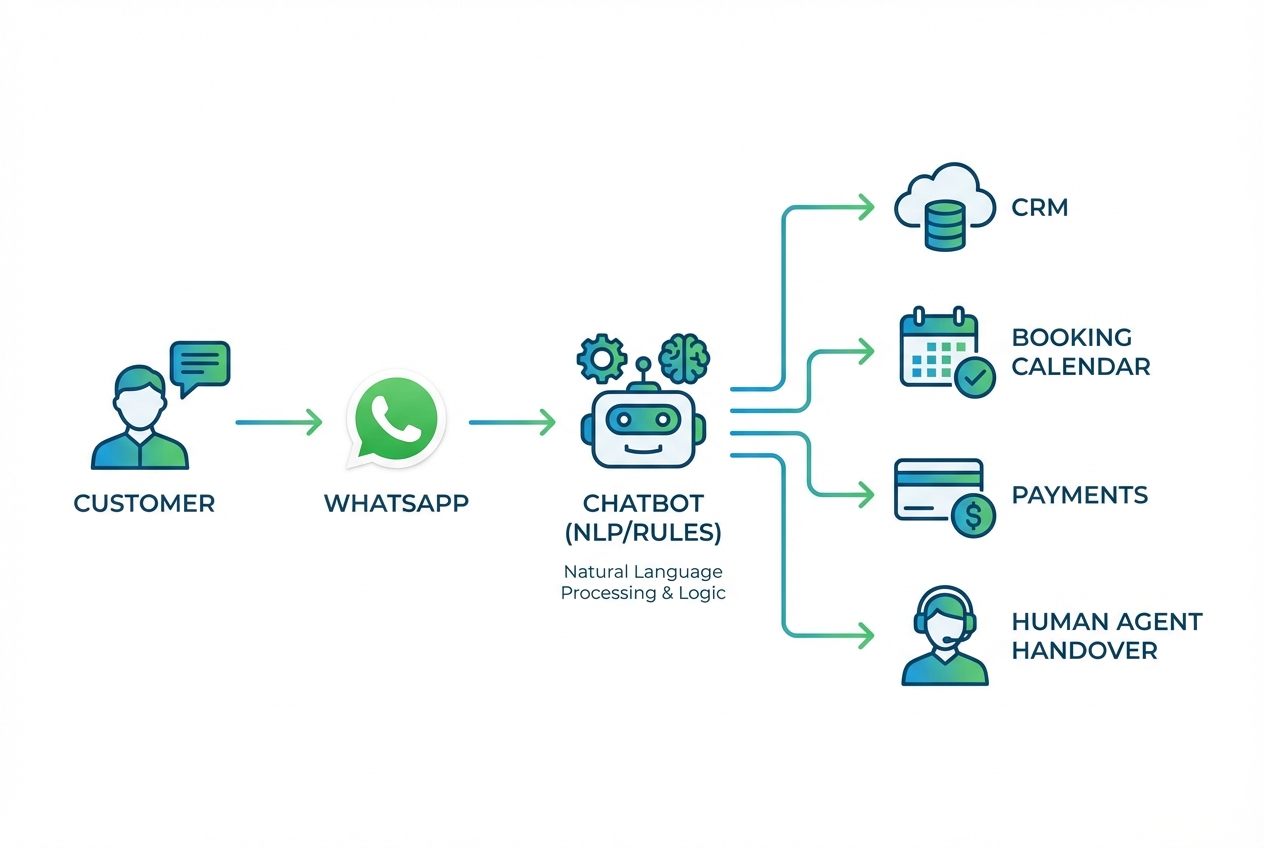
A production-ready WhatsApp bot is typically a small system, not a single script.
Here is the simplest mental model:
- WhatsApp entry point: A user messages your number, taps a “Click to WhatsApp” ad, or scans a QR code.
- Webhook receiver: Your backend receives message events in real time.
- Conversation engine: Rules, forms, and optional natural language processing (NLP) decide what to do next.
- Business systems: CRM, calendar, inventory, payment provider, help desk.
- Human handover: A team member sees the context and takes over when the bot hits edge cases.
If you are a founder, the “hard part” is rarely sending messages. The hard part is turning chat into reliable operations.
How to build a WhatsApp chatbot for business
1) Start with one measurable outcome and one primary flow
Pick a single outcome you can measure in a week. Examples: more booked calls, fewer support tickets, faster quote turnaround.
Then map one primary flow in plain language. Keep it short.
- Lead flow: “Greet → qualify → offer next step (book, quote form, human) → confirm.”
- Support flow: “Identify issue → gather key fields → provide fix or open ticket → confirm expectations.”
A useful constraint: if the flow cannot fit on one screen, it is too big for version one.
2) Decide what must be automated vs human
A bot should handle high-volume, low-risk steps and hand off when the business risk increases.
Good automation candidates:
- FAQs with stable answers: Pricing ranges, availability rules, location, required documents.
- Structured collection: Name, email, order number, preferred date, service type.
- Status lookups: Only if you can connect to a single source of truth.
Good handover triggers:
- Complex pricing: Custom scopes, exceptions, negotiation.
- Sensitive cases: Refund disputes, urgent medical or safety issues.
- Repeated confusion: Two failed attempts to resolve is usually enough to escalate.
3) Set up WhatsApp Business Platform basics
If you go with the WhatsApp Business Platform (Cloud API), you will need to establish the account foundation.
What you are setting up:
- WhatsApp Business Account (WABA): The container that holds your WhatsApp assets.
- Business phone number: A number that can be registered and verified.
- Meta app and permissions: Required to use the Cloud API endpoints.
4) Design templates and understand the 24-hour window
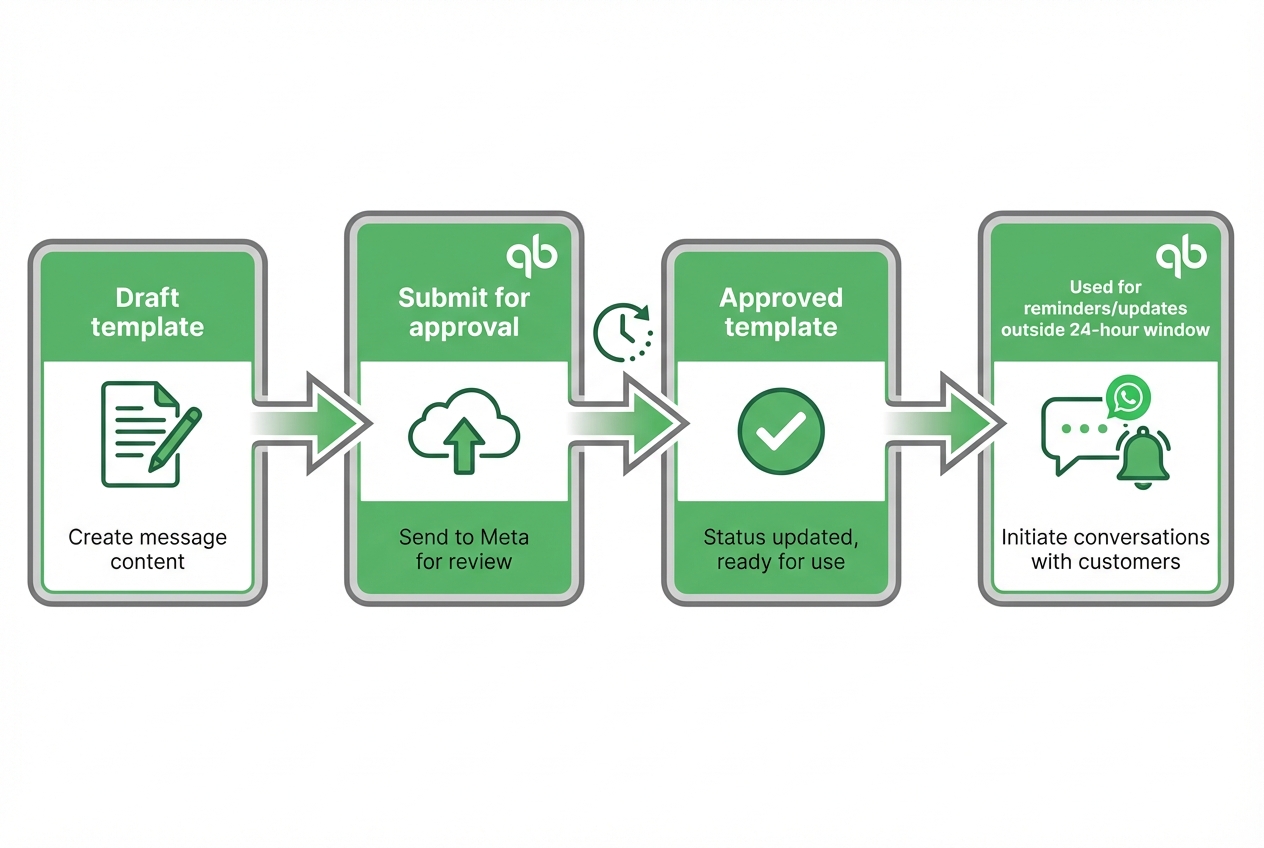
WhatsApp has a concept you have to design around: the customer service window.
- Service window: After a user messages you, you can respond with non-template messages during the open window.
- Template messages: Pre-approved message formats used outside the service window, such as appointment reminders, delivery updates, or marketing.
Meta’s template documentation is explicit about when templates are required and how approval works.
Here's three kinds of templates that's helpful to consider:
- Utility templates: Use for reminders and updates your customer expects.
- Marketing templates: Use sparingly, segment your audience, and give clear value.
- Authentication templates: Use for one-time passwords (OTPs) and verification.
5) Build the conversation logic in a way you can maintain
Most WhatsApp bots fail because they are fragile. The fix is to make the logic boring.
Build with these components:
- State tracking: Track where the user is in the flow (for example: “collecting email” or “choosing time slot”).
- Input validation: Confirm required fields, acceptable formats, and “none of the above” answers.
- Fallback paths: When intent is unclear, offer 2 to 4 buttons instead of asking another open question.
- Data retention rules: Only store what you need to complete the task and support the user.
If you want an operations-friendly way to manage the data behind your bot, a fast path is to build a lightweight internal tool alongside it: a lead inbox, a booking board, and a small customer record view.
This is where an AI app builder can remove weeks of overhead. With QuantumByte, you can prompt out an internal admin panel quickly, then iterate as you see real customer conversations. If you want patterns for structuring those internal tools (inbox, pipeline, handover queue), we have our AI app builder prompts as a practical reference.
6) Connect your chatbot to the systems that make it valuable
A WhatsApp chatbot only becomes a business asset when it can take action.
Common integrations:
- Lead tracking: Create or update a record in your CRM and assign an owner.
- Scheduling: Show available times, create events, and handle reschedules.
- Payments: Generate a payment link, verify paid status, and trigger fulfillment.
- Support desk: Open tickets with structured fields so support is not guessing.
Integration tips that save pain later:
- One source of truth: Decide where customer status lives. Avoid duplicating it.
- Idempotency: Prevent double-bookings and duplicate tickets when messages retry.
- Audit trail: Log key events (template sent, handover triggered, booking confirmed).
7) Add human handover that feels seamless
Customers value the resolution of their problem more than whether the interaction is handled by a bot or a human.
A clean handover includes:
- Context packaging: Summarize what the bot collected (intent, key fields, previous answers).
- Clear expectation: Tell the customer when a human will respond.
- Takeover control: Pause automation when an agent is active, then resume only when the agent ends the session.
If you are building an internal “agent console” to support this, start with three views: new conversations, pending follow-ups, and escalations.
8) Test with real scenarios, then launch progressively
Do not launch with one happy-path test. Launch with uncomfortable tests.
Test categories:
- Edge input: Voice notes, emojis, typos, short replies like “yes” with no context.
- Drop-offs: What happens when a user stops responding mid-flow?
- Policy-sensitive content: Make sure the bot does not drift into restricted topics.
- Timeouts: Verify what happens when integrations are slow or unavailable.
Launch progressively:
- Pilot phase: Start with a subset of inbound traffic.
- Operations check: Monitor handover rate and unresolved cases.
- Controlled scale-up: Expand once your team trusts the system.
WhatsApp pricing and policy constraints you must design around
WhatsApp rules are not a footnote. They shape your costs and your experience.
WhatsApp pricing model
Meta documents that WhatsApp Business Platform pricing is charged per delivered template message and varies by template category and recipient country.
Design implications:
- Template discipline matters: Use templates only when you need them.
- Utility first: Keep operational messages in the utility category where appropriate.
- Track template performance: Poor engagement can affect deliverability and quality scoring.
Policy enforcement is real
If you operate in a restricted category, you need to confirm you are allowed before you automate.
Meta publishes enforcement details and the consequences of repeated violations.
Operational guardrails:
- Content library: Centralize approved answers and templates.
- Agent training: Your human handover messages still count.
- Review loop: If you change offers or product lines, re-check policy impact.
Bot flows that work well for most service businesses
Use these as patterns, not scripts. Your advantage is tailoring them to your exact operation.
Lead qualification flow
- Goal: Route serious inquiries quickly.
- Pattern: Ask service type → location → timeframe → budget range → best contact method.
- Next step: Book, request photos, or hand over.
Booking flow
- Goal: Reduce scheduling back-and-forth.
- Pattern: Offer 3 time slots → confirm details → send calendar confirmation → reminder.
- Next step: Deposit link or intake form.
Order status flow
- Goal: Deflect repetitive support.
- Pattern: Request order number → fetch status → share next expected update.
- Next step: Escalate only when status is abnormal.
Support triage flow
- Goal: Increase first response quality.
- Pattern: Category buttons → collect 2 to 4 fields → provide fix or open ticket.
- Next step: Confirm service level agreement (SLA) expectations.
Metrics that tell you if the chatbot is working
Do not measure “messages sent” as success. Measure what changes in the business.
Start with:
- Containment rate: Percentage of conversations resolved without human help.
- Handover quality: Whether agents say the bot collected the right context.
- Conversion rate: Booked calls, paid deposits, completed orders.
- Time to first meaningful response: How quickly a user gets a useful answer.
- Drop-off points: Where people abandon the flow.
A practical habit: review 20 conversation transcripts weekly. You will spot patterns faster than any dashboard.
Common mistakes to avoid
- Over-automating too early: Start with one flow that supports revenue or reduces a clear workload, then expand.
- No source of truth: If booking status lives in three places, the bot will lie to customers.
- Too much free text: Buttons and structured replies keep the flow reliable.
- Weak escalation: If the customer cannot reach a human quickly, trust erodes fast.
- Ignoring templates until launch: Template approval and categorization should be designed up front.
A practical build approach if you want speed and customization
If you want maximum control, you will likely end up combining:
- Messaging channel: Use WhatsApp Business Platform for messaging.
- Bot backend: Run a small backend for logic and integrations.
- Ops console: Maintain an internal tool for visibility, handover, and operations.
The internal tool is where many founders lose momentum, because they do not want to build a full CRM just to support a chatbot.
QuantumByte is a strong fit when you need the basic supporting system fast. You can use the platform to generate an internal inbox, lead tracker, or booking dashboard, then refine it as the chatbot reveals what your team actually needs. You can start with our prototype tier and upgrade as your need grows.
What you should have after following this guide
You now have a clear path to shipping a WhatsApp chatbot for business that is more than a novelty.
- Platform decision: You know which WhatsApp option to pick based on automation and integration needs.
- Working architecture: You have a workable system that includes webhooks, logic, integrations, and handover.
- Template readiness: You can design around templates, pricing, and policy enforcement instead of discovering constraints late.
- Playbook flows: You have proven flow patterns to adapt to your business.
- Measurement plan: You have metrics to monitor and common mistakes to avoid.
Frequently Asked Questions
Do I need the WhatsApp Business Platform to build a chatbot?
Not always. If you only need basic replies and small-scale operations, the WhatsApp Business App may be enough. If you need reliable automation, webhooks, integrations, and team workflows, the WhatsApp Business Platform (Cloud API) is typically required.
What is the 24-hour rule in WhatsApp messaging?
After a customer messages your business, you can generally send non-template messages during the open customer service window. To message users outside that window, you typically need approved template messages. Meta’s documentation on template messages is the definitive reference.
How much does a WhatsApp chatbot cost to run?
Operating cost depends on your tooling plus WhatsApp messaging fees. On the WhatsApp Business Platform, Meta charges for delivered template messages and pricing varies by category and recipient country, as documented in WhatsApp pricing.
Can a WhatsApp chatbot take payments?
A bot can send payment links and confirm payment status if you integrate with a payment provider and your backend can verify outcomes. The safest pattern is “generate link → user pays → webhook confirms → bot updates status and sends next steps.”
How do I keep the chatbot from frustrating customers?
Use structured replies (buttons), keep flows short, and escalate to a human quickly when the user is confused. A bot should prioritize clarity and speed over trying to answer everything.