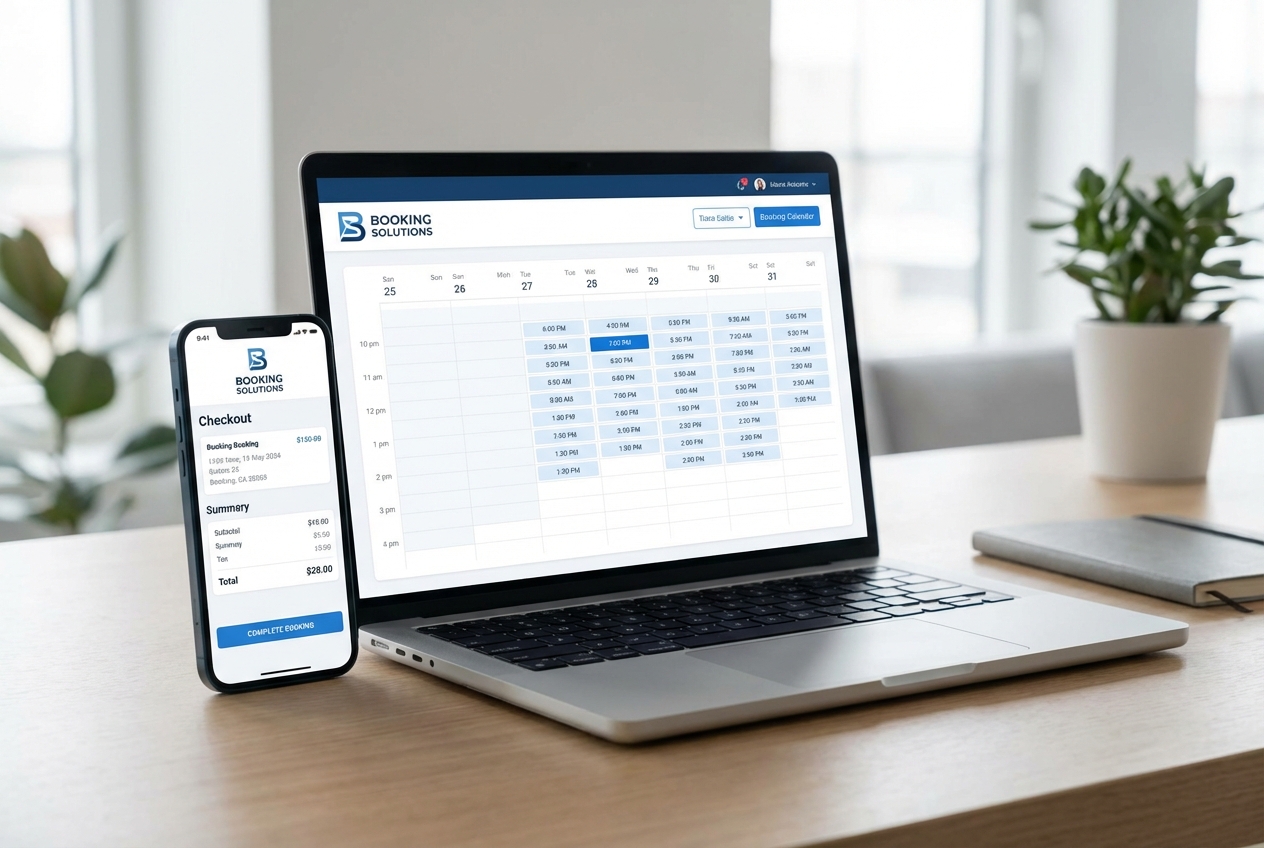
You want clients to book and pay in minutes, under your brand, without duct-taping five tools together. The right white label booking software gives you a branded booking experience (your logo, your domain, your rules) while you keep control of scheduling, staff, payments, and notifications from one system.
What white label booking software is
White label booking software is a booking system you can brand and deliver as if it were your own product.
That typically means:
- Your branding is front-and-center: Your logo, colors, and tone in the booking flow.
- Your domain is the default: A custom domain or subdomain so customers never see a third-party brand.
- You control the experience end-to-end: Service menus, availability, confirmations, reminders, payments, and policies are configured to match how you operate.
If you plan to resell booking as part of a service offering, or you want booking to feel like a native extension of your company, white labeling is the baseline.
When white label beats plug-and-play schedulers
Off-the-shelf schedulers can be fine when you are a solo operator with standard needs. They tend to break down when you need the booking flow to match how your business actually runs.
White label booking software is a better fit when:
- You sell premium services: A generic booking portal can hurt trust, especially for high-ticket offers.
- You have multiple staff or locations: You need clean routing, resource rules, and reporting.
- You need unusual workflows: Deposits, approvals, packages, forms, memberships, or multi-step appointments.
- You want to productize your process: Booking becomes part of a larger client portal or internal operating system.
Core features to require in white label booking software
A white label brand wrapper is not enough. The booking engine underneath needs to be strong.
- Service and pricing catalog: You should define services, durations, buffers, add-ons, and taxes so the system can price appointments consistently.
- Availability and resource rules: You need working hours, time-off, capacity limits, and resource constraints (rooms, equipment) to prevent impossible bookings.
- Client self-serve rescheduling: Customers should be able to change appointments within your policy, reducing admin back-and-forth.
- Automated confirmations and reminders: Email and SMS (Short Message Service) notifications reduce no-shows and keep your schedule clean.
- Payment support: At minimum, deposits and full payments; ideally refunds, invoices, and payment status tracking.
- Intake forms and notes: Collect required information at booking time, then keep it attached to the appointment record.
- Team permissions: Staff-level access control so the right people can view or edit the right data.
- Reporting and analytics: Booking volume, revenue by service, utilization by staff, and cancellation reasons.
White label requirements that actually matter
When teams say "white label," they often mean three non-negotiables. Treat these as selection gates.
- Custom domain: Your booking should live at a domain you control (for example, bookings.yourcompany.com). This protects trust and improves deliverability for emails.
- Brand control across the flow: Color, typography, and tone should be configurable so the experience looks native.
- No third-party brand leakage: Remove "Powered by ..." badges, external portal redirects, and vendor login experiences.
Also consider whether you need:
- Multi-brand support: Different brands, different service catalogs, different policies, one backend.
- Localization: Time zones, currencies, and multiple languages if you serve beyond one region.
Security, privacy, and payments you cannot ignore
Booking systems process personal data and often payment data. That raises your risk profile.
- Web application security: Use a vendor that actively mitigates common web application risks, and align your own implementation with the OWASP Top 10 as a practical baseline for what can go wrong.
- Privacy obligations: If you serve European Union customers, the legal text for the General Data Protection Regulation is the source of truth for requirements around personal data processing.
- Payment card handling: If you store, process, or transmit cardholder data, you fall into the orbit of PCI DSS (Payment Card Industry Data Security Standard).
Practical implementation guidance:
- Minimize data collection: Only ask for what you truly need to deliver the service.
- Prefer tokenized payments: Offload payment data handling to a trusted payment processor.
- Separate roles and logs: You want traceability for who changed availability, pricing, and refunds.
How to choose white label booking software for your business
You will save weeks if you decide up front what you are really building: a scheduler, a branded booking product, or a broader client portal.
Start by answering these questions:
- What is being booked: A single appointment, a multi-step service, classes, or resources (rooms, equipment).
- How revenue is collected: Deposits, full prepay, post-service invoicing, subscriptions, or packages.
- Who is doing fulfillment: One person, a team, or multi-location staff.
- What must integrate: Calendar, customer relationship management (CRM), accounting, customer portal, analytics.
Then evaluate solutions across five dimensions.
| Decision factor | What to look for | Why it matters |
|---|---|---|
| Brand control | Custom domain, theming, white-label removal | Protects trust and reduces churn in the booking flow |
| Booking complexity | Buffers, capacity rules, multi-staff routing | Prevents operational chaos and double-booking |
| Payments | Deposits, refunds, invoices, tax handling | Revenue becomes predictable and auditable |
| Integrations | Calendar sync, CRM, accounting, webhooks | Reduces manual admin and keeps systems consistent |
| Extensibility | Custom fields, custom logic, workflows | Lets you evolve your offer without re-platforming |
If you are planning to expand beyond "appointments" into a broader operations tool, you may want a builder approach rather than a rigid scheduler. QuantumByte’s Enterprise solution is positioned around unifying operational workflows, which is often what booking becomes once you have staff, inventory, approvals, and reporting.
How to implement white label booking software step by step
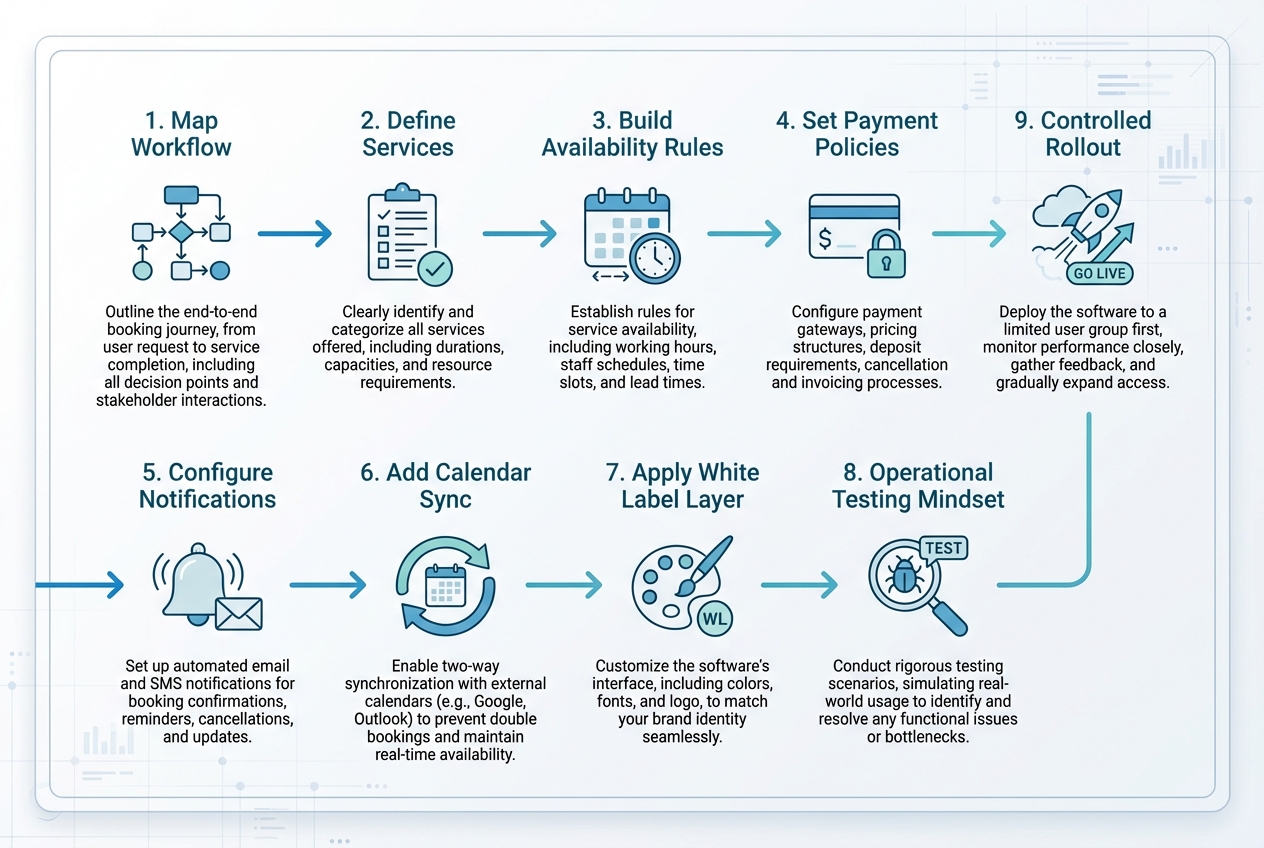
The fastest implementations result from making strategic decisions early rather than rushing the configuration phase. Decide what must be true, encode it once, and you avoid weeks of manual workarounds later.
1) Map your real booking workflow
Write down what happens today from inquiry to completed service.
Focus on:
- Entry points: Website, social, referrals, inbound calls.
- Decision points: Do you approve bookings? Do you require intake forms?
- Exceptions: Late arrivals, no-shows, rescheduling, refunds.
Outcome: a workflow you can implement without constantly overriding the system.
2) Define services as products, not calendar slots
Set up each service with the data the system needs to automate accurately.
- Duration and buffers: Build in travel, setup, and cleanup.
- Capacity rules: One-to-one, one-to-many, or resource-constrained bookings.
- Pricing logic: Add-ons, bundles, or tiered options.
Outcome: the system can schedule correctly and price consistently.
3) Build availability rules that protect operations
Availability is where most booking systems fail in practice.
- Working windows: Distinguish between "open hours" and "bookable hours."
- Blackout rules: Holidays, staff leave, and one-off constraints.
- Resource constraints: Rooms, equipment, or vehicles to prevent over-commitment.
Outcome: you stop fighting your own calendar.
4) Set payment policies that match your risk
Your payment setup should reflect how costly cancellations are.
- Deposits for high-risk slots: Reduces frivolous bookings.
- Prepay for standardized services: Improves cash flow and reduces invoicing overhead.
- Clear refund rules: Keeps support burden predictable.
Outcome: fewer disputes, fewer manual exceptions.
5) Configure notifications that reduce no-shows
Treat notifications as a core part of your service delivery rather than a luxury.
- Confirmation: Include location, links, and next steps.
- Reminders: Time them to your customer behavior (for example, 24 hours and 2 hours).
- Follow-ups: Reviews, receipts, and rebooking prompts.
Outcome: fewer gaps in your schedule and a cleaner client experience.
6) Add calendar sync the right way
If you support calendar export or subscription, align with the iCalendar standard so events are portable across systems. RFC Editor standardizes iCalendar in RFC 5545.
Outcome: fewer "I never saw the booking" issues from clients and staff.
7) Apply your white label layer
This is where your booking flow stops looking like a third-party tool.
- Custom domain and SSL: Use your domain and enforce encrypted traffic.
- Brand styling: Apply consistent colors and typography.
- Copy and policy clarity: Terms, cancellation policy, and privacy messaging should be visible before payment.
Outcome: higher trust and higher conversion.
8) Adopt an operational testing mindset
Run real booking scenarios the way your team will actually operate.
- Happy path: New customer books, pays, receives confirmation.
- Edge cases: Reschedule windows, staff sick day, capacity filled.
- Admin workflows: Refunds, manual overrides, internal notes.
Outcome: fewer launch-day surprises.
9) Launch with a controlled rollout
Start with a subset of services or one location.
- Monitor support tickets: Tag issues by category (availability, payments, messaging).
- Adjust rules, not people: Fix the system configuration so you are not relying on staff memory.
Outcome: stable scaling.
Building a white label booking product quickly with QuantumByte
If your booking needs are simple, a dedicated scheduler may be enough. But if you are trying to white-label booking as part of a broader offer, the friction usually comes from limits: the booking tool does not match your intake, routing, or fulfillment workflows.
This approach is most valuable when you want speed and customization at the same time.
- Start from templates, then customize: Begin from common app patterns and adjust the booking flow and admin tools to match your operation.
- Keep the system founder-friendly: Reduce dependence on hiring a full development team for every change.
Scaling a white label booking system for teams and enterprises
Once you have real volume, the "booking tool" becomes an operations platform. That is where enterprise needs show up.
- Multi-location governance: You need consistent policies with local overrides.
- Role-based access control: Granular permissions for finance, ops, managers, and staff.
- Auditability: Logs for changes to pricing, availability, and refunds.
- Workflow automation: Approvals, exception handling, and routing between departments.
If this is where you are heading, QuantumByte’s Enterprise offering is a natural next step because it is designed for unified operational management instead of isolated point tools. You can also review Pricing to understand the prototype-to-deployment path.
For teams that want proof of execution range, these builds are worth scanning, including the Aziz Ansari build where an app was created within minutes by someone with no experience using such apps prior, the Avian Group operations story, and the Telkomsel deployment.
Common pitfalls to avoid
Most booking rollouts fail for boring reasons. Fix them before you ship.
- Overcomplicated service menus: Too many options increases booking friction and leads to wrong selections. Start with fewer, clearer services and expand based on demand.
- Weak availability rules: If your calendar logic is wrong, everything downstream breaks. Protect buffers and resources first, then optimize utilization.
- Branding only at the top layer: A logo swap is not white labeling. Make sure links, domains, emails, and policy pages all reflect your brand.
- Manual exception handling: If staff routinely override the system, you have not implemented the workflow. Encode rules and approvals so exceptions are tracked, not improvised.
- Ignoring admin UX: Your team lives in the back office. If it is slow or confusing, you will pay for it every day.
What you now have
You now have a practical way to think about white label booking software as a product, not just a calendar.
You covered:
- Key differences: How white labeling differs from standard scheduling tools and when it is worth the trade-off.
- Operational must-haves: The core features that protect scheduling integrity, staff utilization, and revenue collection.
- True white label criteria: The branding requirements that actually define "white label" (domain, theming, and no vendor leakage).
- Risk and compliance basics: The security, privacy, and payment standards that reduce exposure as you scale.
- Implementation path: A step-by-step rollout from workflow mapping to testing and controlled launch.
- Build vs buy framing: How to approach faster, more customizable builds when off-the-shelf tools are too rigid.
Frequently Asked Questions
What is the difference between white label booking software and a booking widget?
A booking widget is usually just the front-end embed. White label booking software includes the full system behind it: service catalog, rules, staff management, notifications, payments, reporting, and often a branded domain experience.
Can I use white label booking software to resell booking as part of my agency or consulting offer?
Yes. That is a common use case. The key is choosing a solution that supports your branding requirements, multi-client or multi-brand setups (if needed), and clean admin workflows so your team is not stuck doing manual support.
Do I need PCI DSS compliance if I take payments for bookings?
If you store, process, or transmit cardholder data, PCI DSS applies. Many businesses reduce scope by using payment providers that tokenize card data so your system does not directly handle sensitive card details. The PCI Security Standards Council is the reference for PCI DSS requirements.
What should I prioritize first: branding or booking rules?
Booking rules. Branding improves conversion, but broken availability and weak policies create operational damage immediately. Get services, availability, and payments correct, then polish the brand layer.
How do I know if I should build a custom booking system instead of buying one?
If your workflow is standard, buy. If your value comes from a unique intake process, routing logic, bundles, approvals, or a larger client portal, building can be the better long-term decision.
A practical signal is whether you need to iterate quickly without hiring a full development team. That is the founder-friendly gap a builder approach can cover. For example, QuantumByte’s Aziz Ansari build shows what that speed can look like in the real world: an app built within minutes by someone with no experience using such apps prior. If you want to prototype fast and keep flexibility as requirements mature, start with our basic plans and scale up as your booking flow becomes a broader operating system.