
Stop struggling with prompts that spit out half-working code, missing files, and vague "it depends" replies. Most AI coding roadblocks come from unclear instructions, and the right chatgpt prompts for coding force clarity: inputs, outputs, constraints, tests, and a clean plan you can actually ship.
What “good” chatgpt prompts for coding do differently
A strong coding prompt does not ask for “some code.” It defines a target and the rules of the game.
- Defines the role and goal: Tell the model it is a senior software engineer and name the exact outcome, like “implement an API endpoint” or “refactor this module.”
- Pins down inputs and outputs: Provide sample payloads, expected responses, file names, and function signatures so the model cannot guess.
- Adds constraints: Specify language version, libraries you allow, performance limits, and style rules.
- Forces verification: Require unit tests, edge cases, and how to run the tests locally or in continuous integration (CI).
- Scopes the task: One feature at a time. If you need a full app, split it into milestones.
OpenAI’s own guidance leans the same way: clear instructions, breaking complex tasks into sub-tasks, and systematic testing, as outlined in the OpenAI prompt engineering guide.
A prompt framework that produces clean code
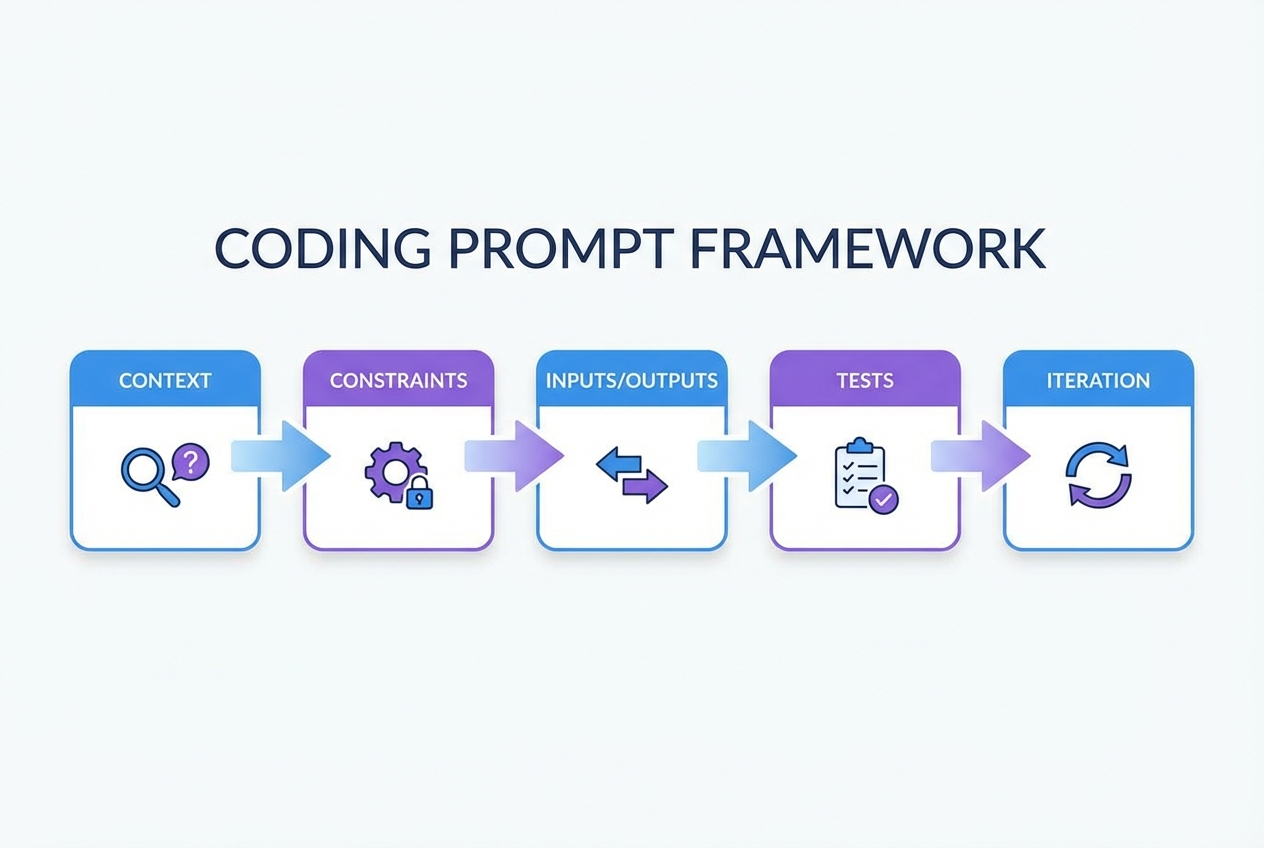
Use this five-part structure (you can paste it into any chat):
- Context: What you are building, who it is for, and what already exists.
- Constraints: Language, framework, allowed packages, style, and non-goals.
- Inputs and outputs: Data shapes, examples, and acceptance criteria.
- Tests: Unit tests, integration tests, edge cases, and “how to run.”
- Iteration: Ask for a plan first, then code, then a review checklist.
If you are trying to go beyond snippets and build a real product, this is also the mindset behind turning rough ideas into buildable specs. our breakdown of the flow is worth a skim: how an AI app builder works.
Best chatgpt prompts for coding libraries and packs
The fastest way to get better results is to start from templates that already “bake in” good constraints. The picks below are the best sources to steal structures from, remix, and standardize.
Images under each item are representative previews. Swap them for fresh screenshots of each homepage or product page during publishing.
| Pick | Best for | Why it’s on the list |
|---|---|---|
| Awesome ChatGPT Prompts | Quick prompt patterns | Huge library you can adapt into coding roles and workflows |
| AIPRM | Prompt menus inside ChatGPT | One-click templates, useful for repetitive coding tasks |
| FlowGPT | Community-tested prompts | Easy to browse “what works” and copy frameworks |
| PromptBase | Paid, niche prompt packs | When you want a specific, polished prompt for a job-to-be-done |
| PromptHero | Searching prompt examples | Broad discovery across styles and use cases |
| OpenAI Prompt Engineering Guide | Crafting prompts that behave | Official best practices to reduce ambiguity and increase correctness |
| OpenAI Cookbook | Practical dev recipes | Real code examples for building with models and agents |
| Learn Prompting | Learning prompt fundamentals | Good grounding so you can write your own templates confidently |
1. Awesome ChatGPT Prompts
The Awesome ChatGPT Prompts repository is a goldmine for role-based prompt structures. Even when a template is not “coding-specific,” the framing is reusable: define the persona, define output format, enforce constraints.
Use it for:
- Role prompts: Create “senior backend engineer,” “QA engineer,” and “security reviewer” prompt roles.
- Output discipline: Copy patterns that force checklists, step-by-step plans, and structured responses.
2. AIPRM
AIPRM is useful when you want “prompt menus” inside your day-to-day workflow. Instead of reinventing a template, you pick a known structure and fill in your details.
Use it for:
- Repetitive dev tasks: Boilerplate generation, refactors, and documentation drafts.
- Consistency across a team: Standardize how people ask for code reviews, tests, and bug fixes.
3. FlowGPT
FlowGPT is one of the quickest ways to browse what other builders are actually using. The main win is discovery: you will find prompt formats you would not think to write yourself.
Use it for:
- “Show me a working structure” moments: Grab the skeleton, then replace the content with your project details.
- Niche tasks: Migration prompts, “act as” prompts, and specialized codegen workflows.
4. PromptBase
PromptBase is a marketplace. That matters when you are under pressure and want a “ready-made” prompt for a specific job, like writing tests for a framework or generating a certain kind of API client.
Use it for:
- Speed: Buying a good template can be faster than experimenting for hours.
- Specialization: Prompts tailored to a stack, output format, or deliverable.
5. PromptHero
PromptHero is a search engine for prompt ideas. For coding, the value is less about “the one perfect prompt” and more about scanning patterns fast.
Use it for:
- Prompt phrasing ideas: Discover different ways to express constraints and acceptance criteria.
- Format inspiration: Look for prompts that force tables, diffs, or step-by-step output.
6. OpenAI Prompt Engineering Guide
If you want fewer hallucinations and more correct code, start with the source. The OpenAI prompt engineering guide is the most practical “rules of the road” for writing prompts that behave.
Use it for:
- Prompt hygiene: Clear instructions, reference text, and stepwise tasks.
- Quality control: A mindset of testing and iterating, not “one-shotting” huge builds.
7. OpenAI Cookbook
The OpenAI Cookbook is where prompt theory meets real code. You get runnable examples for building model-powered features and coding agent workflows.
Use it for:
- Developer-ready patterns: Implementation ideas you can drop into a repo.
- Model-powered tooling: Review bots, code modernization flows, and agent loops.
8. Learn Prompting
Learn Prompting helps you build the core skill: writing your own prompts on demand. That matters if you are productizing expertise and cannot rely on a template library forever.
Use it for:
- Fundamentals: Clear instruction writing and iterative improvement.
- Transferable skill: The same principles apply whether you are coding, writing specs, or generating tests.
Copy-and-paste ChatGPT prompt templates for coding
Use these as “starting packets.” Replace the bracketed fields and keep the output requirements strict.
- Feature implementation prompt: You are a senior software engineer. Implement [feature] in [language/framework]. Constraints: [constraints]. Output: (1) short plan, (2) code changes as unified diffs, (3) unit tests, (4) how to run tests locally.
- Bug reproduction prompt: Act as a debugging assistant. Given this error: [error], this stack trace: [trace], and this code: [snippet], produce (1) likely root causes ranked, (2) minimal reproduction steps, (3) a fix with a diff, (4) tests that would have caught it.
- Refactor without behavior change prompt: Refactor the following module for readability and maintainability without changing behavior. Provide a diff and explain each change. Add characterization tests first if coverage is weak. Code: [paste].
- Unit test generator prompt: Write unit tests for the following function using [test framework]. Include edge cases and failure cases. If dependencies exist, mock them. Function: [paste].
- API endpoint prompt: Create an HTTP endpoint for [action]. Input JSON schema: [schema]. Output JSON schema: [schema]. Add validation, auth checks, and error handling. Provide OpenAPI (OpenAPI Specification) snippet and tests.
- Database migration prompt: Propose a safe migration plan for [change]. Include backward compatibility, rollout steps, and rollback steps. Provide migration SQL and application code diffs.
- Performance prompt: Profile and optimize this code for [latency/throughput]. Constraints: keep behavior the same, avoid new dependencies. Provide a plan, code diff, and a micro-benchmark.
- Security review prompt: Review this code for security issues. Focus on injection risks, auth bypass, insecure deserialization, and unsafe output handling. Provide concrete fixes with diffs. Code: [paste].
- Code review prompt: Act as a strict reviewer. Review this pull request diff: [diff]. Output: (1) must-fix issues, (2) suggestions, (3) tests missing, (4) risks.
- Documentation prompt: Write README documentation for this repo: [context]. Include setup, environment variables, common commands, and troubleshooting.
If you want more structured prompt templates for building entire internal tools, we also publish practical patterns in its guide to AI app builder prompts.
Workflow: from prompt to shipped feature
Most teams fail with AI coding because they treat it like a vending machine. Use a workflow instead.
- Write the acceptance criteria first: What must be true when the feature is “done”? Include edge cases.
- Ask for a plan, not code: Make the model outline steps, files touched, and risks.
- Generate a small diff: One module or one endpoint at a time.
- Demand tests: If it cannot be tested, it cannot be trusted.
- Run and iterate: Paste back errors and failing tests, and keep the scope tight.
- Harden for real users: Logging, input validation, timeouts, and permissions.
This is also where builders graduate from “coding help” to “shipping systems.” If your end goal is to productize a workflow, start by mapping the process you want to automate. our guide on how to automate business processes is a strong reference for that step.
Speed up your coding workflow with QuantumByte
The biggest friction in AI coding is the toggle tax: getting code from ChatGPT into your environment, testing it, formatting it, and pasting errors back. It is a slow, manual loop.
We remove that friction. Instead of copy-pasting snippets, you build the entire feature in one workspace where requirements, data models, and code generation happen together. You get the speed of AI without the context-switching tax.
Start building faster with QuantumByte
Security and correctness traps to avoid
AI-generated code can be dangerously confident. You stay safe by treating output as untrusted until tested and reviewed.
- Prompt injection risk: If you are building tools that take user input and feed it into a model, you must plan for malicious inputs that try to override instructions. The OWASP Top 10 for Large Language Model Applications is the most useful checklist to ground your threat model.
- Insecure output handling: Never execute generated code directly. Validate, sandbox, and review before it touches production.
- Dependency drift: Models may suggest outdated packages or insecure patterns. Pin versions and scan dependencies.
- Missing edge cases: Ask explicitly for edge cases, failure modes, and negative tests.
If you are building for a larger org with compliance needs, you will also want a tighter process around governance and data boundaries. That is where our enterprise solution fits naturally.
Wrapping up: use prompts to multiply impact, not add chaos
You now have:
- Prompt framework: A simple framework for writing chatgpt prompts for coding that produce cleaner, testable output.
- Libraries and packs: The best prompt libraries and packs to copy proven structures from.
- Prompt templates: Copy-and-paste prompt templates for common engineering tasks.
- Shipping workflow: A practical workflow for turning prompts into shipped features.
If you are done experimenting and ready to turn a real business idea into a working app, the most direct next step is to draft a structured spec and generate the first version. Check out our pricing page to get started.
If your longer-term plan is to build once and sell many times, pair that with our playbooks on a white-label app builder model and practical app monetization strategies.
Frequently Asked Questions
What are the best chatgpt prompts for coding?
The best prompts are specific and test-driven. They define the role, the exact deliverable, constraints (stack, style, performance), and require unit tests plus a runnable command. Use the “Context, Constraints, Inputs/Outputs, Tests, Iteration” framework in this guide.
Should I ask ChatGPT for the whole app in one prompt?
No. Ask for a plan first, then build in small diffs. Whole-app prompts usually create inconsistent structure, missing files, and untestable code.
How do I get ChatGPT to stop changing unrelated code?
Add constraints like: “Only modify these files: [list]. If you need changes elsewhere, propose them but do not implement them.” Also require unified diffs so you can see exactly what changed.
How can I verify AI-generated code quickly?
Require unit tests and at least one integration test for the critical path. Then run the tests locally or in CI. If the model cannot provide tests, treat the output as a draft, not a solution.
Can prompts help if I’m not a developer?
Yes, but you will get the best results when the prompt outputs structure, not just code. That is why tools that convert natural language into requirements and workflows matter when your goal is a real product, not a snippet.

