
Cursor gets unreliable when your instructions are vague. Cursor prompts fix that by giving the model the exact context, constraints, and output you expect.
Once you learn a repeatable prompt structure, Cursor stops guessing. It starts shipping.
This guide shows you a practical, repeatable way to write cursor prompts for real product work: new features, refactors, bug fixes, and tests. No fluff, just patterns you can reuse.
What cursor prompts are and what they are not
A cursor prompt is the instruction you give to Cursor (the artificial intelligence (AI) code editor) so it can plan changes, write code, and modify files in your repo.
Treat prompts as lightweight specs.
- They are not magic wishes: If you do not provide context (the relevant files, data shape, and constraints), the model will fill gaps with assumptions.
- They are not full requirements documents: You do not need 20 pages. You need the right details, presented clearly.
- They are not one-shot commands: The best results come from a short plan-first loop: clarify, plan, implement, verify.
If you already use AI to turn ideas into build-ready instructions, the same mindset applies. our approach to structured prompting for app building, for example, focuses on cutting guesswork by writing prompts that define workflows and data up front.
The 6-part framework for reliable cursor prompts
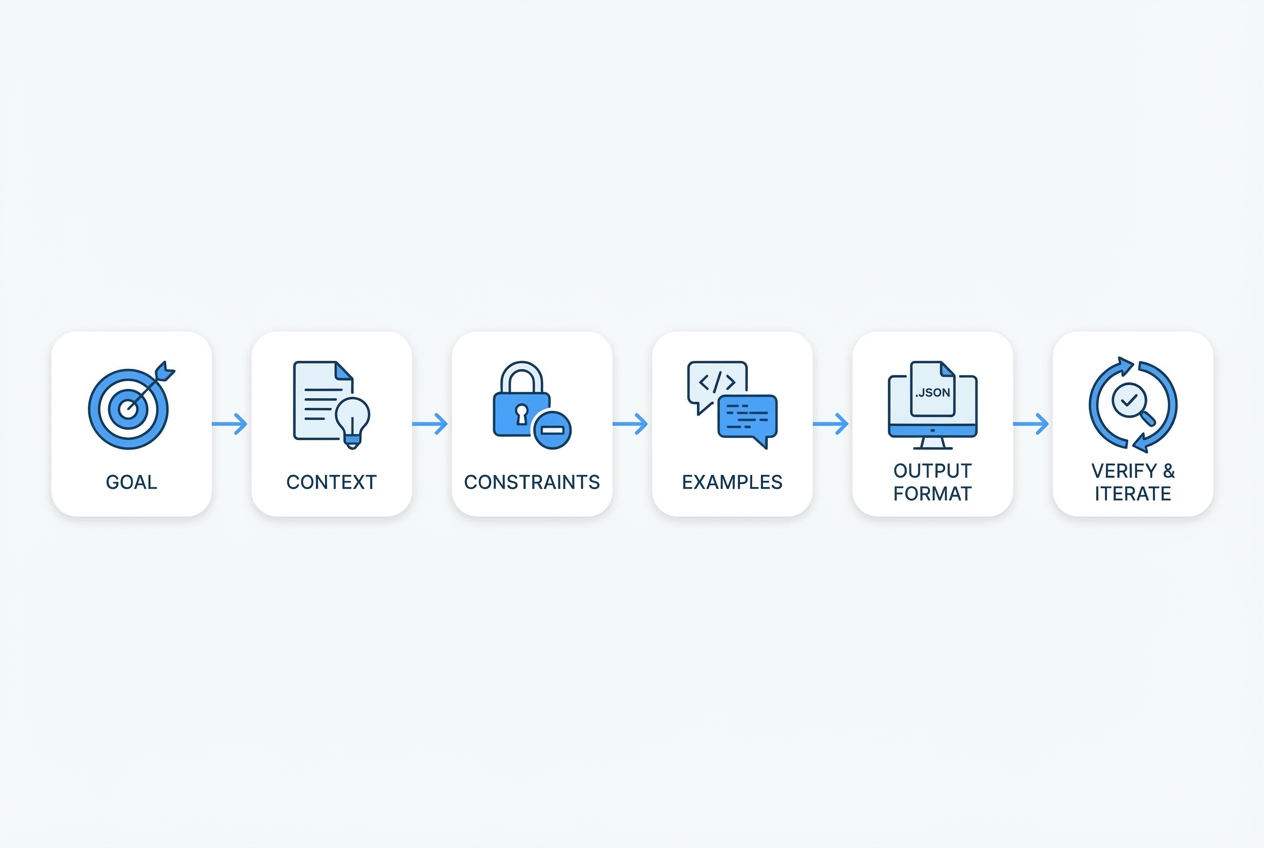
Use this structure for almost every Cursor task.
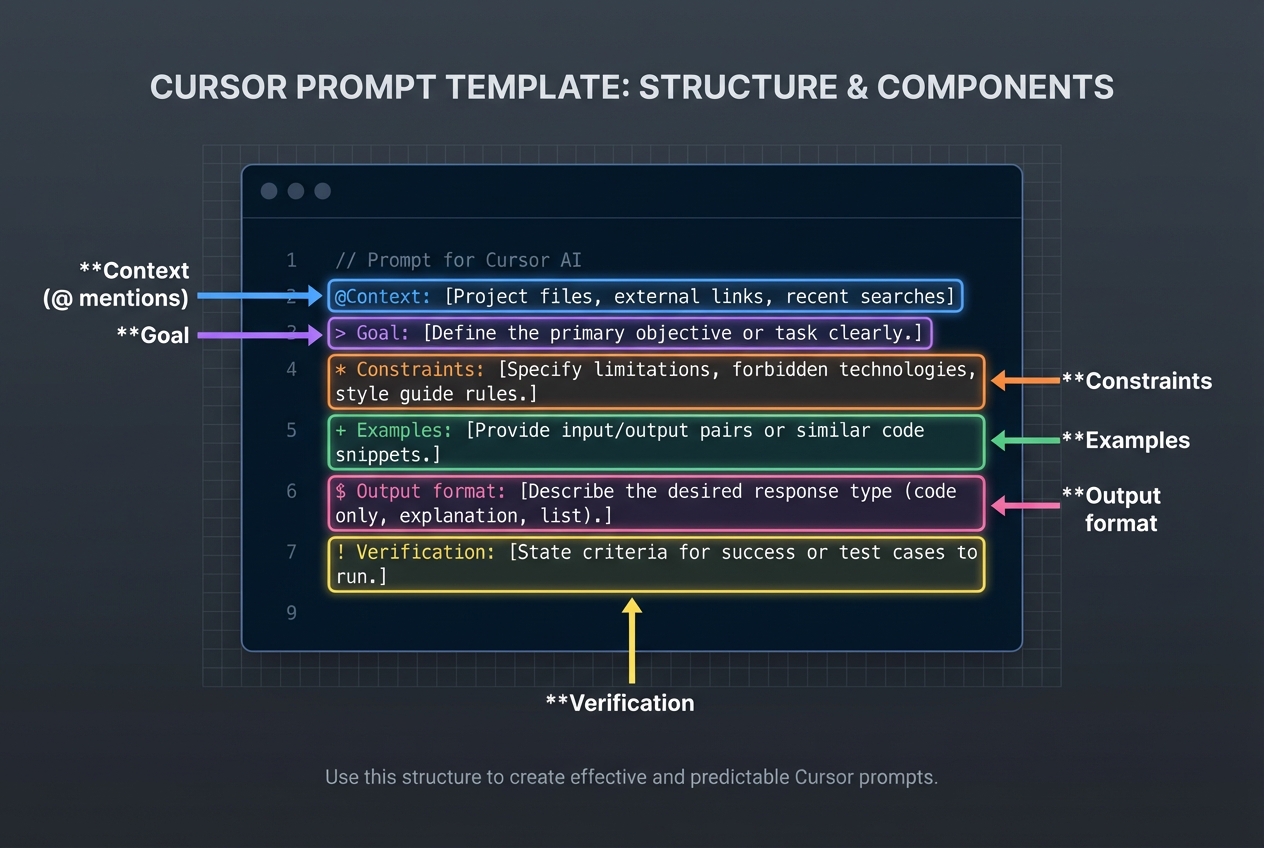
- Goal: State the outcome in one or two sentences.
- Context: Point Cursor at the relevant files, folders, and current behavior. Cursor supports explicit context via @ mentions. The official docs cover how to use mentions to attach code and documentation.
- Constraints: List what must stay true: libraries, patterns, performance limits, security rules, backwards compatibility.
- Examples: Give one or two examples of expected behavior or input/output. Examples are the fastest way to reduce ambiguity.
- Output format: Tell Cursor exactly how you want the answer: a plan, a diff, a list of files to edit, test cases, or a migration note.
- Verify and iterate: Ask for tests, run commands, and a quick self-check list. Verification is where most AI coding wins happen.
How to write cursor prompts step by step
1) Start with a tight goal
A good goal is specific enough to guide decisions, but not so narrow that the agent cannot choose good implementation details.
- Strong goal: Add a password reset flow using existing email provider. Include request, token validation, and reset endpoints.
- Weak goal: Implement auth improvements.
If your goal is business-driven, translate it into a single measurable outcome. The same framing helps when deciding whether to build custom software at all (see build vs buy guidance).
2) Provide context the agent can trust
Cursor can search, but you get better accuracy when you anchor it.
- Point to the source of truth: The API lives in
src/api. Auth middleware is insrc/middleware/auth.ts. - Attach current behavior: Today,
POST /resetdoes nothing and returns 501. - Include data shapes: User table has
id,email,password_hash,reset_token_hash,reset_expires_at.
When you are working in a large repo, use Cursor’s context tools instead of pasting huge blocks. Mentions are designed for this.
3) Declare constraints and non-goals
Constraints keep Cursor from helpfully rewriting your architecture.
-
Constraints: Guardrails that must stay true, so the implementation fits your existing system.
- Library constraints: Use the libraries already in the project. If the project uses Zod, do not switch to Yup.
- Style constraints: Follow the existing folder structure and naming.
- Security constraints: Never log secrets, keep tokens hashed, enforce rate limiting if present.
-
Non-goals: Explicit boundaries, so Cursor does not expand scope.
- No UI redesign: Do not change CSS or layout.
- No schema changes: Do not alter database schema unless required. If required, propose the migration first.
4) Ask for a plan before code when the change is non-trivial
For anything that touches multiple files, ask for a plan first. It is faster than cleaning up a half-right implementation.
A practical pattern:
- First message: Plan only. No code.
- Second message: Implement the approved plan.
Cursor explicitly supports a plan-first workflow (Plan Mode), which helps the agent research your codebase and propose steps before editing files.
5) Specify the output format you want
If you want a diff, ask for a diff. If you want file-by-file edits, ask for that.
- Diff format: Provide a unified diff for each changed file.
- File list format: List files to create/edit, then show full contents for each new file.
- PR-ready format: Include a short pull request (PR) description and testing notes at the end.
OpenAI’s general prompt engineering guidance also recommends using clear structure and delimiters to reduce confusion and make outputs predictable.
6) Force a verification loop
Cursor is most valuable when it helps you close the loop.
Ask for:
- Tests: Add unit tests for token expiry and invalid token.
- Run commands: Run
pnpm testand fix failures. If you cannot run, explain what would fail. - Edge cases: List 5 edge cases and confirm coverage.
If you want a broader workflow mindset, GitHub Copilot’s prompt engineering guidance aligns with this idea: provide context, break work into steps, and iterate instead of asking for everything at once.
How to make Cursor consistent with project rules
Cursor prompts work best when your repo has stable house rules. Cursor supports persistent rules that shape agent behavior across a project.
Cursor’s own guidance on agent best practices recommends keeping rules focused on essentials and pointing to canonical examples in your codebase.
Practical rules to add:
-
Codebase conventions: The defaults Cursor should follow when creating or changing code.
- File structure: Where new modules should live.
- Patterns: Preferred error handling, logging, validation, and testing style.
-
Safety rails: Rules that prevent accidental scope creep and breakage.
- No breaking changes: Avoid changing public function signatures without a migration plan.
- No dependency drift: Do not add packages unless explicitly requested.
-
Commands: The runbook Cursor should follow before declaring the task done.
- Local runbook: Use
pnpm lintandpnpm testbefore marking done.
- Local runbook: Use
If you are also building internal tools, document these rules once and reuse them across projects. The same principle is why teams create structured build docs before they generate apps (see how an AI app builder works).
A prompt library you can reuse
The fastest way to level up is to stop writing prompts from scratch.
| Use case | Copy-and-paste cursor prompt template | What success looks like |
|---|---|---|
| Plan a feature | "Plan only. Goal: {goal}. Context: @file @folder. Constraints: {constraints}. Output: a step-by-step plan with files to change and risks." | You get a plan you can review in 60 seconds and approve or adjust. |
| Implement a feature | "Implement the approved plan. Follow existing patterns. Output: unified diffs per file + tests + brief testing notes." | Code compiles, tests exist, minimal style drift. |
| Refactor safely | "Refactor @file to reduce complexity. Constraints: no behavior change. Add/adjust tests to prove equivalence. Output: diffs + before/after explanation." | Cleaner code with identical behavior and test proof. |
| Debug a bug | "Reproduce the bug based on this description: {steps}. Instrument with logs if needed. Propose 2 likely root causes, then implement fix with tests." | Root cause is explicit, fix is small, tests prevent regressions. |
| Write tests | "Add tests for @file. Cover happy path and edge cases: {list}. Use existing test framework. Output: diffs only." | You get focused tests that match your repo’s tooling. |
| Document an API | "Generate API docs for @file. Output: Markdown with endpoints, request/response examples, error cases." | Clear docs a teammate can use without asking you questions. |
Three real examples of cursor prompts that ship
Example 1: Add a trial ending soon email
Use this when you want a small feature but with real constraints.
Prompt
- Goal: Add a scheduled email to notify users 3 days before trial ends.
- Context: @src/billing @src/jobs @src/email
- Constraints: No surprises, no duplicates, and no time math bugs.
- No new email provider: Use the existing provider wrapper.
- Idempotent job: If the job runs twice, users should not get two emails.
- Time zones: Use UTC and existing date helpers.
- Output format: Plan only. List files to edit and new tests.
Then follow with:
Prompt
- Goal: Implement the plan.
- Output format: Unified diffs + tests + short testing notes.
Example 2: Refactor an API route without breaking clients
Prompt
- Goal: Refactor @src/api/orders.ts to reduce duplication.
- Context: @src/api/orders.ts @src/services/orders
- Constraints: Keep client behavior identical.
- No API changes: Request/response shapes must remain identical.
- Keep error codes: Do not change status codes or error messages.
- Output format: Diffs + behavior parity checklist at the end.
Example 3: Debug a flaky test
Prompt
- Goal: Fix flaky test in @src/tests/payments.test.ts
- Context: Include the failing output pasted below.
- Constraints: Fix determinism, not symptoms.
- No increasing timeouts: Avoid making the test slower.
- Determinism: Remove reliance on real time and network.
- Output format: Provide the response in these sections, in this order.
- Root cause analysis: Provide a clear explanation of why the test is failing and what makes it flaky.
- Proposed fix: Describe the minimal changes needed to make the test deterministic.
- Diffs and updated tests: Provide unified diffs for all changed files and confirm the test now covers the same intent.
Common cursor prompt mistakes and how to fix them
Most Cursor wrote bad code stories are really the prompt left too many degrees of freedom.
-
Mistake: Asking for too much at once.
- Fix: Split into plan, then implement, then verify. You ship faster because you review earlier.
-
Mistake: No constraints.
- Fix: Add 3 to 7 constraints. Focus on dependencies, data model, and what must not change.
-
Mistake: Missing the source of truth.
- Fix: Attach the relevant files and call out where the canonical patterns live.
-
Mistake: No output format.
- Fix: Ask for diffs, a file list, or a plan with explicit steps.
-
Mistake: Skipping verification.
- Fix: Always request tests and run commands. If you cannot run locally, make Cursor propose how you should verify.
When prompts are not enough and what to do next
Cursor is excellent for accelerating well-scoped engineering work. It is not a replacement for product judgment.
Escalate to a deeper build process when:
- You need cross-system design: Multiple services, complex data migrations, or compliance requirements.
- You are productizing expertise: Turning a service into a Software as a Service (SaaS) product needs tighter specs, onboarding flows, and support workflows.
- You keep iterating in circles: That usually means the requirements are unclear, not that the model is weak.
This is where structured documentation becomes your leverage. Structured documentation turns messy ideas into build-ready instructions that AI can execute, then brings in human engineers when the last 10% needs real-world polish. Quantum Byte can help you turn your next feature into a clean spec you can build.
If your goal is operational leverage, it can also help to map the workflow first, then automate it. The same thinking shows up in our guides on automating business processes and specialist workflows like accounts payable workflow automation.
A simple workflow for shipping faster with cursor prompts
Here is a workflow you can reuse each week.
-
Define the change in one paragraph Write the goal, success criteria, and what must not change.
-
Collect the minimum context Attach files, data shapes, and any relevant docs. Avoid dumping the whole repo.
-
Ask for a plan Review the plan like you would review a pull request description.
-
Implement in small slices If the plan spans 10 files, implement in 2 to 3 chunks. That keeps diffs reviewable.
-
Verify with tests and a checklist Treat verification as part of the task, not an optional step.
If your work is in logistics or operations, you will recognize this pattern: clarity first, then execution. It is the same reason dashboards and systems work best when they centralize facts and reduce guesswork (see transportation management system dashboard).
What you should take away
You now have a practical system for writing cursor prompts that produce predictable, reviewable code:
- 6-part prompt structure: Use goal, context, constraints, examples, output format, and verification to reduce ambiguity.
- Plan then implement loop: Ask for a plan on any non-trivial change, then approve and execute in slices.
- Reusable prompt templates: Copy proven wording for features, refactors, debugging, tests, and docs so you do not reinvent your process.
- Project rules and rails: Define house conventions so Cursor stays consistent across the repo.
If you want to go beyond better prompts and move into days, not months execution, pair structured instructions with a build process that can actually ship. We help you formalize your intent so AI and engineers can move faster with fewer surprises.
Frequently Asked Questions
What are cursor prompts, exactly?
Cursor prompts are instructions you give inside Cursor to plan and apply code changes. The best prompts include a clear goal, the right context (files and current behavior), constraints, and a required output format.
Should I write one big prompt or many small ones?
Use many small prompts. Ask for a plan first, then implement in slices, then verify. This prevents context noise and reduces accidental rewrites.
How do I give Cursor enough context without pasting everything?
Use @ mentions to reference the key files and folders. Cursor’s documentation explains how mentions attach code and docs as context (Cursor @ mentions).
What should I do when Cursor keeps changing unrelated files?
Add constraints and non-goals. Also set persistent project rules so Cursor knows your conventions. Cursor’s own best practices emphasize keeping rules focused on essential commands and patterns (Cursor agent best practices).
Can cursor prompts help me build a SaaS product, not just code snippets?
Yes, if you treat prompts like lightweight specs: define workflows, data models, and edge cases. If you need to turn that into a full product build, structured documentation plus a build team can take you further. Our Packet workflow is designed for that handoff: build a Packet.
When should I stop prompting and involve a developer?
Stop when you hit architectural decisions, data migrations with risk, security and compliance needs, or repeated almost right loops. At that point, prompts are signaling that the real problem is unclear requirements or system design, not code generation.

