
You are using Copilot to ship faster, and you do not have time to babysit vague suggestions. The difference between “meh” output and production-ready code often comes down to one thing: your github copilot prompts.
This guide shows you how to write prompts that reliably produce cleaner code, better tests, and safer changes without turning your workflow into a prompt-writing job.
What strong GitHub Copilot prompts do differently
Strong prompts set up the work so Copilot makes correct choices, rather than simply asking for code.
Here is what strong prompts consistently include:
- A clear goal: State the outcome you want, in one sentence, before you talk about implementation.
- Relevant context: Point Copilot at the file, function, API, or constraints that matter so it does not invent assumptions.
- Constraints and non-goals: Tell it what not to do so you avoid rewrites, breaking changes, or dependencies you do not want.
- Examples: Provide an input/output pair, sample data, or a unit test so Copilot learns the pattern you expect.
- An output format: Specify how you want the answer delivered (patch, code block, step-by-step plan, tests first).
GitHub’s own docs underline the same fundamentals: break work into smaller tasks, be specific, provide examples, and validate what it suggests in your normal review and tooling flow .
The prompt framework for GitHub Copilot prompts
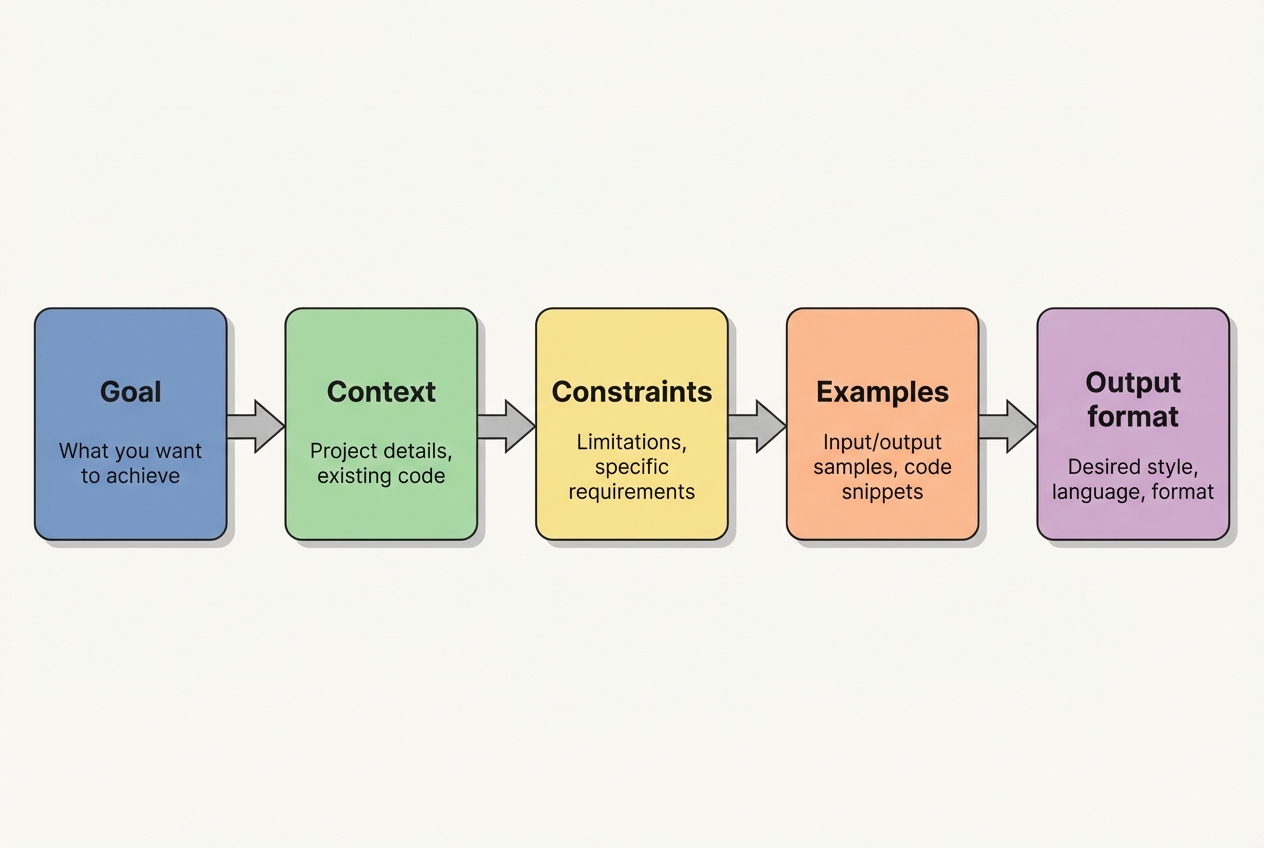
Use this five-part structure when you want Copilot to behave like a focused teammate.
- Goal
- Context
- Constraints
- Examples
- Output format
You will not always need all five parts, but when Copilot keeps missing the mark, this is the fastest way to tighten it up.
How to write GitHub Copilot prompts for real-world code
These steps work whether you are building a SaaS (Software as a Service) product, automating internal ops, or cleaning up a legacy codebase.
Step 1: Choose the right Copilot surface
Copilot behaves differently depending on where you prompt.
- Inline suggestions: Best for small units of work like a function, loop, test case, or docstring.
- Copilot Chat: Best for refactors, multi-file changes, design discussions, debugging, and iterative back-and-forth.
When you are doing anything that spans more than a few lines, move to Chat. It is easier to steer.
Step 2: Feed Copilot the right context on purpose
Copilot performs better when it can “see” what you are working with.
In Visual Studio Code, inline suggestions use context from the current file and open files, so keeping related files open improves results. For Chat, you can explicitly attach context using # items like a file or #codebase.
Practical ways to do this:
- Keep a “neighboring tab” open: Open the model, service, and test file that touch the change.
- Highlight the code: Select the function or class before asking for a change.
- Name exact symbols: Use real function names, routes, tables, and types.
Step 3: Start with the goal, then add specifics
This one shift reduces rambling outputs.
In Copilot Chat, GitHub recommends you start with a broad description of the goal, then list specific requirements.
Use this pattern:
- Goal example: “Goal: …”
- Requirements example: “Requirements: …”
Step 4: Add constraints and non-goals to prevent expensive rewrites
Constraints are how you protect your architecture.
Good constraints look like this:
- Stack constraints: “Use Node.js 20, TypeScript, and Prisma. No new libraries.”
- Performance constraints: “Avoid N+1 queries. Keep it streaming.”
- Security constraints: “Do not log secrets. Validate input with Zod.”
- Non-goals: “Do not change API responses or database schema.”
If you skip constraints, Copilot often “solves” the problem by changing everything around it.
Step 5: Provide examples that lock in the pattern
Examples are your leverage.
GitHub explicitly calls out examples and unit tests as a way to show Copilot what “correct” looks like.
Good example types:
- A unit test first: “Write tests that fail, then implement.”
- Sample input/output: “Given this payload, return exactly this shape.”
- One good reference function: “Match the style of
createInvoice().”
Step 6: Specify the output format you want
This is how you reduce chatter and get usable artifacts.
Ask for one of these:
- Unified diff: “Return a unified diff.”
- Single-file output: “Return only the final code for
Foo.ts.” - Tests then implementation: “Return Jest tests first, then implementation.”
- Plan then confirm: “Return a step-by-step plan, then ask me to confirm before coding.”
Step 7: Iterate in smaller bites
When Copilot misses, do not re-ask the same thing louder. Narrow the problem.
GitHub’s best practices recommend breaking complex tasks down, being specific, and rewriting prompts when needed.
A tight iteration loop:
- Ask for a plan: Start by getting the shape of the solution so you can spot bad assumptions early.
- Approve the plan: Confirm the approach and constraints before any big code gets generated.
- Generate one file: Keep scope small so the diff stays reviewable.
- Run tests immediately: Let your tooling tell you what is true.
- Fix issues: Feed back the error, logs, or failing test and iterate in the same small scope.
Prompt templates you can reuse
These templates are designed to be copied into Copilot Chat and edited quickly.
Refactor a messy function without changing behavior
-
Prompt:
Goal: Refactor
calculatePricing()for readability and testability without changing behavior.Context: This is TypeScript. Current function is in
pricing.tsand is used bycheckoutService.ts.Constraints: Do not change the function signature. Do not change returned values. No new dependencies.
Output format: Return a unified diff and include new unit tests in
pricing.test.ts. -
Why it works: You are protecting the contract while asking for clean structure and tests.
Generate tests for a known bug
-
Prompt:
Goal: Add regression tests for a bug where
endDatebeforestartDatedoes not throw.Context: Validator lives in
dateRange.ts.Constraints: Use Jest. Keep tests small and descriptive.
Examples:
- End date before start date: startDate=2026-02-01, endDate=2026-01-31 should throw
InvalidDateRangeError. - Same start and end date: startDate=2026-02-01, endDate=2026-02-01 should pass.
Output format: Return only the test file contents.
- End date before start date: startDate=2026-02-01, endDate=2026-01-31 should throw
-
Why it works: Examples remove ambiguity and make the acceptance criteria explicit.
Implement an API client with safe error handling
-
Prompt:
Goal: Create a small API client for the Acme API.
Context: Node.js 20 + TypeScript. We already use
fetch. Auth is a bearer token stored inACME_TOKEN.Constraints: No new dependencies. Handle non-2xx responses with a typed error. Do not log the token.
Output format: Provide
acmeClient.tsplus a short usage example. -
Why it works: It guides both the interface and the failure modes, which is where most clients go wrong.
Debug a failing test with minimal changes
-
Prompt:
Goal: Fix the failing test without changing the public behavior.
Context: Here is the failure output and the relevant code. Explain the root cause first.
Constraints: Smallest diff possible. Keep the existing test intent.
Output format: 1) Root cause 2) Proposed fix 3) Unified diff.
-
Why it works: You get diagnosis plus a controlled fix, instead of random edits.
A quick table of high-leverage GitHub Copilot prompts
Use this as a chooser when you are not sure what to ask for.
| Goal | Prompt starter | What you get |
|---|---|---|
| Design a change | “Propose a plan to…” | A sequence of steps you can approve before code is written |
| Generate a module | “Create a file that…” | A complete file with imports and structure |
| Safer refactor | “Refactor without changing behavior…” | Cleaner code while preserving contracts |
| Add tests | “Write regression tests for…” | Tests that capture edge cases and prevent repeat bugs |
| Performance fix | “Optimize this hot path with constraints…” | Focused changes that respect your stack and non-goals |
| Explain code | “Explain what this does and risks…” | A clear read on behavior, edge cases, and security risks |
Copilot prompts for founders building product, not just code
If you are a business owner or solopreneur, your real goal is usually “turn this workflow into software.” Copilot helps you move faster inside a repo. But you still need clarity on the product itself: screens, data model, user roles, edge cases, and what “done” means.
A practical workflow:
- Use Copilot to prototype: Generate CRUD (Create, Read, Update, Delete) endpoints, admin screens, basic tests.
- Turn the prototype into a product spec: Write down roles, permissions, data rules, and the “boring” operational details.
- Decide what must be custom: Integrations, billing logic, compliance requirements, and performance constraints.
If you want a faster way to create that spec from plain English, our workflow is built for it. You describe the app, it turns your intent into structured documentation that AI and developers can actually build from.
This pairs well with Copilot because your prompt quality rises when your requirements are written down clearly.
For more on the broader approach, we also break down how an AI app builder works and what AI app builder prompts look like in practice.
Quality, safety, and IP checks you should not skip
Copilot can accelerate output. It cannot own the risk.
GitHub explicitly recommends validating suggestions and reviewing for security, readability, and maintainability, plus using automated tooling like linting and code scanning.
Bake these habits into your flow:
- Run tests immediately: If you do not have tests, prompt Copilot to write them first.
- Use linters and formatters: They catch issues Copilot will not.
- Review security paths: Auth, input validation, file system access, deserialization, and anything that touches secrets.
- Confirm dependencies: If Copilot introduces a library, make sure you actually want it.
- Watch for “too perfect” code: If something looks overly generic, ask Copilot to explain how it works and where it can fail.
When Copilot is not enough
Copilot is strongest when the task is well-bounded and the codebase is already coherent.
It struggles when:
- Requirements keep shifting: If “done” changes every hour, Copilot will happily chase the moving target and you will pay the rewrite tax.
- Domain context lives outside the repo: Multi-system integrations, pricing rules, compliance, and workflow quirks often sit in people’s heads, not in code.
- Internal tools must match reality: If your ops team has a precise process, “close enough” UI and logic can break adoption fast.
- You need end-to-end ownership: Product decisions, architecture, QA (Quality Assurance), deployment, and monitoring require real accountability.
- The codebase is inconsistent: If patterns are mixed and naming is messy, Copilot has fewer reliable signals and quality drops.
This is where hybrid execution wins. Use Copilot to move fast, then lean on experts for the parts that must be correct.
If you are building a serious internal system or an actual product line, our enterprise delivery is designed for “days, not months” execution, with AI speed plus an in-house team to finish what tools cannot.
If you are still deciding whether to hire developers or start with faster tooling, our breakdown of hiring a developer vs no-code is a solid reality check.
What you now have in your toolkit
You can get consistently better Copilot output by prompting with intent, not vibes.
You covered:
- A prompt structure that holds up: Goal, Context, Constraints, Examples, and Output format give Copilot fewer places to guess.
- The right interface for the job: Inline suggestions for small edits, Chat for multi-file changes and debugging.
- Copy-paste templates that save time: Refactors, tests, API clients, and “explain then fix” debugging prompts.
- Quality and safety habits that scale: Tests, linters, dependency review, and security checks keep “fast” from becoming “fragile.”
- A bridge from code to product clarity: When requirements are written clearly, both Copilot and humans ship better work.
If your bigger mission is operational leverage, the same prompt discipline applies to business automation too. our guide on automating business processes maps that path well.
Frequently Asked Questions
What is the ideal length for GitHub Copilot prompts?
Long enough to remove ambiguity, short enough to keep focus. Start with a one-sentence goal, then add only the context and constraints that matter. If you find yourself writing paragraphs, you likely need to split the work into smaller tasks.
Should I ask Copilot for a plan before code?
Yes for anything non-trivial. A plan forces alignment on approach and reduces the “rewrite tax.” It also makes it easier to review the intent before you review the code.
How do I stop Copilot from changing unrelated parts of the code?
Use constraints and non-goals. Call out exactly what must not change (public APIs, schemas, response shapes). Also ask for a unified diff so you can see scope immediately.
How do I get better results in VS Code Copilot Chat?
Attach the right context. VS Code supports referencing workspace context with # items like files and #codebase, and it uses open files as signal for inline suggestions (VS Code Copilot prompt engineering guide).
What is the fastest way to get Copilot to write correct tests?
Give it examples. Provide at least one input/output case or a clear bug description. If you already have a failing behavior, ask for a regression test first, then implementation.
Why does Copilot sometimes sound confident but still be wrong?
Because it generates plausible code based on patterns, not guaranteed truth. That is why GitHub recommends validating suggestions and using your normal review and automated tooling (GitHub Copilot best practices).
Are there simple rules for better prompts when starting from a blank file?
Yes. GitHub’s own guidance emphasizes setting the stage with a high-level goal, making your ask simple and specific, and giving an example or two when possible (how to write better prompts for GitHub Copilot).