
You want an app that matches what you pictured in your head, not a “close enough” prototype that breaks the moment you add real users. That is exactly what lovable prompts are for: prompts that give an AI builder enough clarity, constraints, and acceptance tests to build the right thing fast.
This guide shows you how to write lovable prompts that consistently produce usable screens, sensible data models, and workflows you can actually ship.
What lovable prompts are and why they matter
A lovable prompt is a structured product brief written in plain English.
When you write lovable prompts, you are doing three things at once:
- Reducing ambiguity: You remove interpretation space so the builder does not invent features, screens, or data you never wanted.
- Front-loading product decisions: You make key choices early (users, permissions, workflows, constraints), so the build does not drift.
- Making the output testable: You define “done” with acceptance tests so you can validate quickly and iterate with confidence.
This matters most when you are building:
- Internal tools: Admin panels, ops dashboards, CRM-like systems, and workflow automation.
- Niche SaaS: A focused product with one sharp promise and a paid subscription.
- Client portals: A clean front end tied to a simple back end and notifications.
If you are productizing expertise, the prompt is your spec. Treat it like an asset.
The Lovable Prompt Blueprint
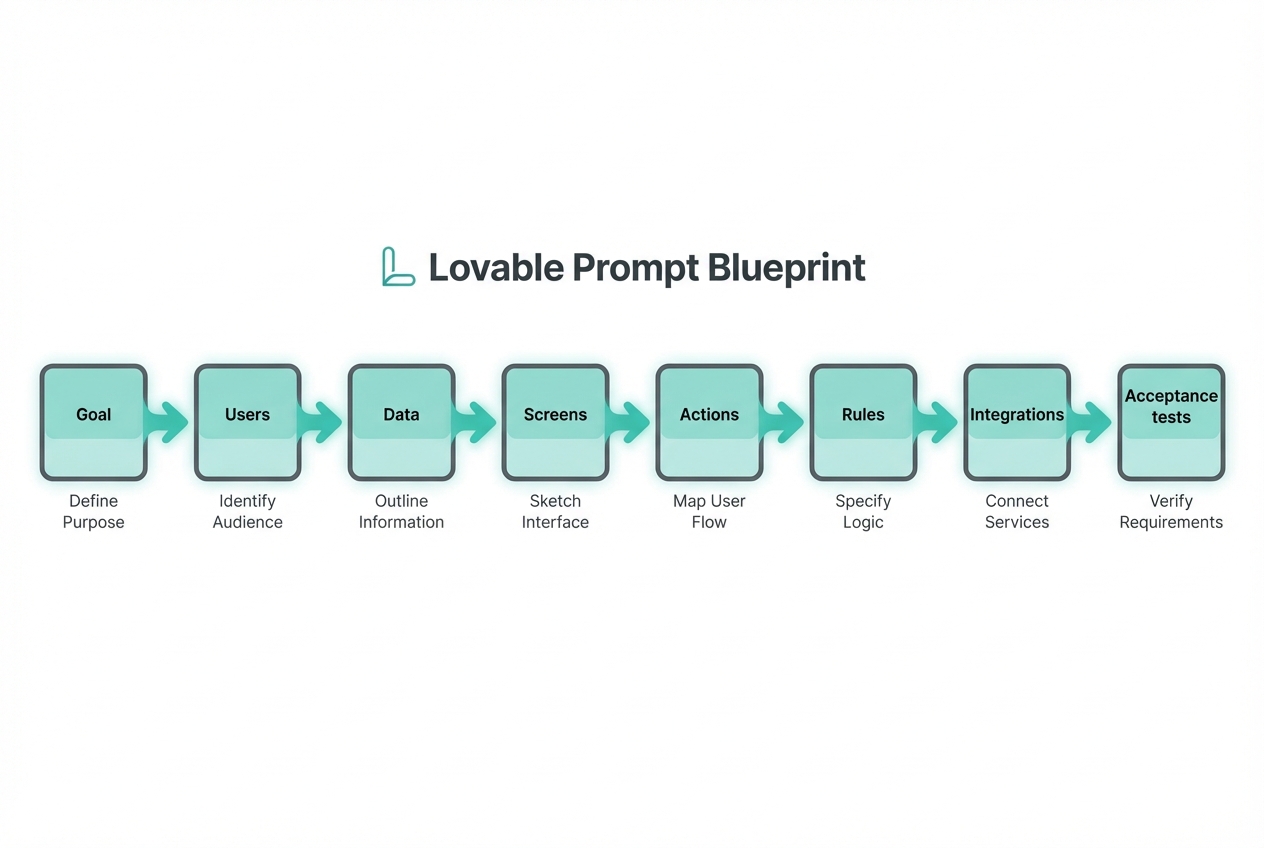
Use this blueprint to shape your prompt so the build comes out predictable.
- Goal: The one sentence outcome your app must deliver.
- Users: Who uses it, and what each role can do.
- Data: The key records you store (tables/objects) and their relationships.
- Screens: The pages the user sees, in the order they use them.
- Actions: The workflows that change data (create, approve, assign, pay, export).
- Rules: Constraints, validations, and edge cases.
- Integrations: Email, calendar, payments, CRM, accounting, webhooks, or an application programming interface (API).
- Acceptance tests: A short list of “when I do X, I should see Y.”
If your prompt is missing one of these, the AI builder fills the gap with guesses.
How to write lovable prompts step by step
Step 1: Start with the outcome, not the feature list
Write one outcome that is measurable in human terms. Think: “what changes after this exists?”
- Good outcome: “Reduce back-and-forth by letting clients upload files, answer intake questions, and see project status.”
- Weak outcome: “Build a client portal.”
In your prompt, include:
- Who it helps: The user type and scenario.
- What success looks like: The result, not the implementation.
- What you are not building: One or two explicit exclusions.
Example snippet:
- Goal: Build a client portal for a bookkeeping firm that collects monthly documents, tracks missing items, and shows status by client.
- Not in scope: No payroll processing. No direct bank connections in v1.
Step 2: Define roles and permissions early
Most “wrong app” builds come from missing role definitions.
Include roles like:
- Admin: Can manage users, settings, templates, and view all records.
- Staff: Can work assigned items, comment, and mark tasks complete.
- Client: Can only see and upload their own data.
Example snippet:
- Roles: Admin, Staff, Client.
- Permissions: Client can upload files and view their own checklist. Staff can request items and change status. Admin can create new clients and manage templates.
Step 3: Describe the data model in plain English
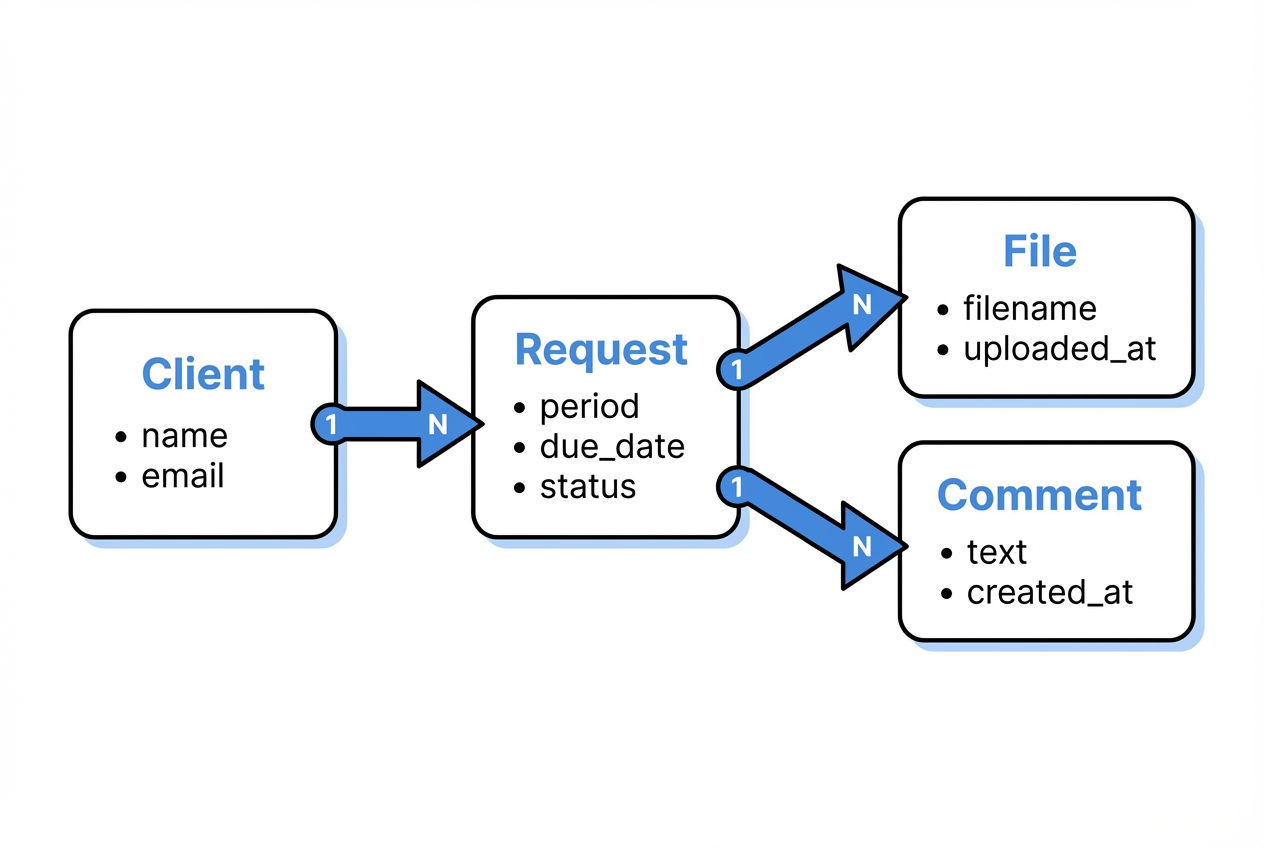
You do not need to be a database expert. You just need to name the “things” and how they connect.
Use a simple pattern:
- Entity (record): What it represents.
- Fields: The minimum details you must store.
- Relationships: One-to-many or many-to-many.
Example snippet:
- Client: name, email, company, onboarding_date, status.
- Request: client_id, period (YYYY-MM), requested_items (list), due_date, status (open, waiting, complete).
- File: request_id, filename, type, uploaded_by, uploaded_at, storage_url.
- Comment: request_id, author_role, text, created_at.
Step 4: List screens in the order users move through them
AI builders respond well to “screen inventory.” Keep it concrete.
- Client dashboard: Shows current month request, missing items, and upload button.
- Upload screen: Drag-and-drop, file type hints, and progress.
- Request detail: Checklist, comments, status history.
- Staff queue: Filter by due date, status, and assigned staff.
- Admin settings: Templates for monthly checklists.
If you can add one line per screen for the key call-to-action, even better.
Step 5: Specify workflows as triggers and outcomes
Workflows are where apps become valuable.
Write workflows like this:
- Trigger: What event starts it.
- Steps: What happens.
- Outcome: What changes in the system.
Example workflows:
- Request creation: On the 1st of each month, create a Request for each active Client using that client’s template.
- Reminder: If status is waiting and due_date is within 3 days, email the client.
- Completion: When all required items are uploaded, mark Request as complete and notify staff.
Step 6: Add rules and edge cases to prevent “demo-ware”
Rules are what make the v1 safe to ship.
Include constraints such as:
- Validation: Required fields, file type restrictions, max upload size.
- Security: Clients can never access other clients’ requests or files.
- State changes: Only Staff or Admin can mark a request complete.
- Auditability: Keep a simple status history.
This is also where you avoid prompt injection style issues: clearly state that only your instructions and permitted inputs should drive behavior, especially if you are generating emails or summaries. NIST flags prompt injection as a real risk for generative systems, especially when they handle untrusted input from users or content sources like webpages and documents.
Step 7: Define acceptance tests so you can verify fast
Acceptance tests turn your prompt into something you can check in minutes.
Write 8 to 15 tests in plain language:
- Client upload works: When a client uploads a PDF to their request, it appears in that request’s file list.
- Permissions hold: When a client tries to access another client’s request URL, they get blocked.
- Auto-reminder fires: When a request is due in 3 days and still waiting, an email is sent.
This step is how you stop endless “tweak the UI” cycles.
Prompt templates you can copy
Use these as starting points for your own lovable prompts.
| Template | Best for | Prompt skeleton to paste |
|---|---|---|
| Internal ops app | Teams drowning in spreadsheets | Goal: … Users/Roles: … Core entities: … Screens: … Workflows: … Rules: … Acceptance tests: … |
| Client portal | Service businesses scaling delivery | Goal: … Client experience flow: … Staff flow: … Permissions: … Notifications: … Acceptance tests: … |
| Micro-SaaS | Solopreneurs productizing expertise | Target user: … Value promise: … Pricing model (high level): … MVP scope: … Admin tools: … Analytics needed: … Acceptance tests: … |
| Marketplace lite | Two-sided workflows without heavy complexity | Sides: Buyer/Seller Listings data: … Search/filter needs: … Checkout or lead capture: … Dispute rules: … |
If you want your prompt to come out more consistent across iterations, follow the same structured format every time. Both OpenAI and Google recommend being explicit, providing context, and iterating with systematic tests rather than rewriting randomly.
A strong lovable prompt example
Below is a single prompt you can adapt. Keep the formatting and swap the content.
Prompt:
Build a web app called "Monthly Close Copilot".
Goal
- Outcome: Help a small ecommerce business run a consistent monthly close by assigning tasks, collecting evidence files, and tracking completion.
Users and roles
- Admin Role: Manages templates, users, and sees all months.
- Accountant Role: Works tasks, uploads evidence, marks tasks complete.
- Owner Role: Views progress, comments, cannot edit templates.
Data model
- Company Entity: name, timezone.
- Month Entity: company_id, month (YYYY-MM), status (open, closed).
- TaskTemplate Entity: name, description, default_due_day.
- Task Entity: month_id, template_id, assignee_user_id, due_date, status (todo, doing, blocked, done), completed_at.
- EvidenceFile Entity: task_id, filename, storage_url, uploaded_by_user_id, uploaded_at.
- Comment Entity: task_id, author_user_id, text, created_at.
Screens
- Login
- Month dashboard: progress bar, overdue tasks, filter by status
- Task detail: description, status, evidence files, comments
- Admin templates: CRUD for task templates
- Reports: export completed tasks and evidence list as CSV
Workflows
- Month creation workflow: Admin selects a month and generates tasks from TaskTemplates.
- Due dates workflow: Task due_date is the month plus default_due_day.
- Notifications workflow: Email assignee when a task is assigned and 2 days before due_date.
Rules
- Template editing rule: Owner cannot edit templates.
- Month closure rule: Only Admin can close a month.
- File type rule: Evidence files allowed types: PDF, JPG, PNG.
- Audit trail rule: Every status change is logged.
Acceptance tests
- Generated tasks appear: When Admin generates a month, tasks appear for each template.
- Evidence upload shows up: When Accountant uploads a PDF to a task, it appears in EvidenceFile list.
- Owner can export report: When Owner visits Reports, they can export CSV.
- Owner blocked from admin: When Owner tries to access Admin templates, access is denied.
Common lovable prompt mistakes and how to fix them
These are the failure patterns that waste the most time.
- Vague scope: If your prompt says “make it modern” or “make it user friendly,” you will get random UI choices. Replace this with 3 concrete UI requirements, like “left nav with 5 items,” “table with filters,” and “mobile-friendly forms.”
- Missing data definitions: If you do not name the records, you will get either a flat list or a bloated schema. Add 5 to 8 entities max for v1.
- No permissions: If roles are missing, the app will default to unsafe access patterns. Write permissions in one short block.
- Too many features in v1: If you ask for 20 workflows, you will get 20 half-working workflows. Pick the 2 workflows that create the business value.
- No acceptance tests: If “done” is not defined, you will debate details forever. Add tests so you can validate quickly.
How to iterate without losing quality
Iteration is where most builders either win or spiral.
Use a tight loop:
- Lock your structure: Keep the same headings (Goal, Users, Data, Screens, Workflows, Rules, Acceptance tests) so changes are comparable.
- Change one variable at a time: Add one screen, one workflow, or one role per iteration.
- Keep a running changelog: One line: “Added Staff queue filters” or “Restricted client file visibility.”
- Test the acceptance list first: Do not explore UI polish until the tests pass.
If you want a proven way to keep prompts structured, our flow is built around turning your idea into structured documentation that AI can reliably build from. That “structured first” approach is what keeps your app aligned with your business outcome.
When prompting is enough and when you need engineering
Lovable prompts get you very far, but not all the way in every case.
Prompting is usually enough when:
- Your data model is simple: A handful of entities with basic relationships.
- Integrations are light: Email notifications, basic webhooks, single sign-on.
- Risk is low: Internal tools without sensitive compliance requirements.
You likely need engineering support when:
- You need complex permissions: Row-level security, multi-tenant access, or complex audit trails.
- You have real integrations: NetSuite, Salesforce, custom enterprise APIs, or unusual auth.
- You need performance guarantees: Large datasets, advanced search, or strict uptime requirements.
This is the gap we are designed for. You can build fast with the AI builder, then bring in the team when you hit the edge of what prompts can safely handle. The result is still “days, not months,” but with the reliability of real software engineering behind it.
If you are building for a larger organization, the Enterprise offering is built for unified operations, automation, and higher-stakes systems.
Practical references worth using
If you want to level up your prompt craft with proven guidance:
- OpenAI prompt engineering guide: Practical guidance on clarity, context, breaking tasks down, and testing prompt changes.
- Google Cloud prompt engineering overview: A clear overview of prompt engineering strategies, including being specific and iterating with examples.
- NIST AI 600-1: A security-focused framing on risks like prompt injection and why testing and oversight matter when systems handle untrusted input.
Wrapping up what you can build next
Lovable prompts are how you turn a fuzzy idea into a buildable spec. You learned a blueprint that makes AI outputs predictable, a step-by-step method for defining users, data, screens, workflows, and rules, and a way to validate fast with acceptance tests.
Your next move is simple: pick one workflow that would remove chaos from your week, write a structured prompt, and ship a v1 you can iterate.
Frequently Asked Questions
What makes a prompt “lovable” instead of just “detailed”?
A lovable prompt is detailed in the right places: goal, users, data, screens, workflows, rules, and acceptance tests. It avoids random detail that does not change the build (like long brand stories) and focuses on decisions the builder must get right.
How long should lovable prompts be?
Long enough to remove ambiguity, short enough to stay readable. For most v1 apps, 400 to 1,200 words is plenty if it is structured. If it is unstructured, even 200 words can cause drift.
Should I include design instructions in my prompt?
Yes, but keep them concrete. Specify layout patterns (sidebar, table filters, form layout) and a simple style direction (light theme, high contrast). Avoid subjective words like “sleek” unless you pair them with specifics.
How do I prompt for integrations safely?
Name the integration, specify the direction of data flow, and define what data is allowed to leave the system. Also include rules about secrets: “Never display API keys in the UI. Store credentials securely.”
What if the AI builder keeps building the wrong thing?
Do not rewrite everything. Keep the same structure, then change one section:
- If screens are wrong: Update the Screen list.
- If data is wrong: Tighten the Data model.
- If behavior is wrong: Add Rules and Acceptance tests.
Then re-run.
Can I use lovable prompts to build something I can sell?
Yes. This is one of the fastest ways to productize expertise into a niche SaaS. Start with a narrow user, one core workflow, and a simple admin area. When you hit scaling or integration limits, move from prompts to engineering.
Where should I start if I want to build with QuantumByte?
Start by picking a plan and shaping your idea into a document, letting the platform turn it into structured documentation.

